Add custom CSS buttons
CSS Selector lets you manage reusable class shortcuts in a plugin-level library without PHP. Custom buttons remain available on Gravity Forms 3.0 and later, even though built-in legacy Ready Classes are hidden.
Manage the class library
- Open Forms → Settings → CSS Selector.
- Click Add class.
- Enter one Class name without a leading dot or spaces, such as
event-highlight. - Optionally enter a Label, Description and Group. Rows with the same group appear together in the picker.
- Click Save Settings.
- Open the CSS modal on a field and select your shortcut.
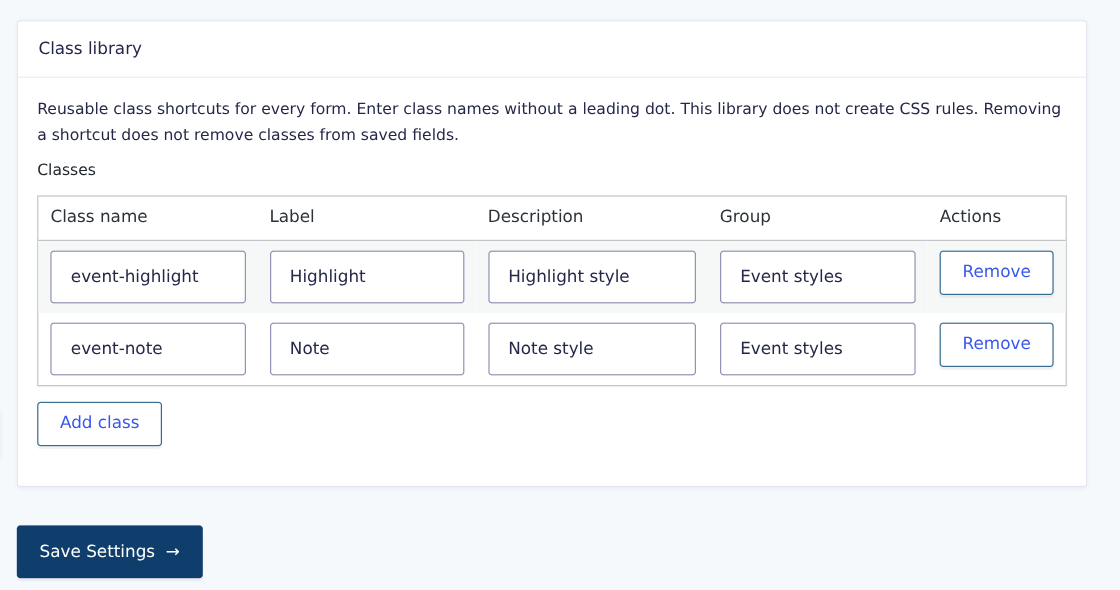
The library is shared across forms. Removing a shortcut does not remove its class from saved fields. CSS Selector stores class names, not stylesheet rules; your stylesheet must define their appearance.
Add buttons with the developer filter
The gwp_css_selector_add_custom_css filter remains available for code-defined quick buttons and groups alongside the saved library.
Add the following PHP snippet to your child theme’s functions.php or a custom plugin. It appends quick buttons and a custom group at the top of the picker. Replace css_class, css_class_2, css_class_3 and css_class_4 with your own class names.
CSS Selector adds class names to the field; it does not generate styles. Define the matching rules in your stylesheet. Existing saved field classes are preserved when you select a shortcut.
// Add custom CSS buttons and a group at the top of the picker.
function my_custom_gwp_css_selector_add_css( $html ) {
    $html .= "<div class='gwp_quick_links'>
    <a class='gwp_css_link' href='#' rel='css_class' title='Insert css_class'>Custom CSS</a>
    <a class='gwp_css_link' href='#' rel='css_class_2' title='Insert css_class_2'>2nd Custom CSS</a></div>
    <li>
    <a class='gwp_css_acc_link' href='#'>Custom CSS</a>
    <div class='gwp_css_accordian'>
    <a class='gwp_css_link' href='#' rel='css_class_3' title='Insert css_class_3'>3rd Custom CSS</a>
    <a class='gwp_css_link' href='#' rel='css_class_4' title='Insert css_class_4'>4th Custom CSS</a>
    </div>
    </li>";
    return $html;
}
add_filter( 'gwp_css_selector_add_custom_css', 'my_custom_gwp_css_selector_add_css' );