Min(), Max() and Pow() in Formulas
Advanced Number Field adds support for the min(), max() and pow() functions, which can be used in Number Field calculations. Min() and Max() return the lowest or the highest value from a list of merge tags; Pow() raises a value to a power.
Using Min() and Max() calculations
Enable Calculations in the settings of a number field. Use Min or Max within the formula with a comma-separated list of number field merge tags. Note that calculations within Min() or Max() are not supported.
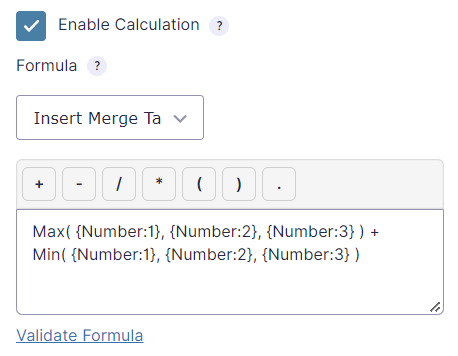
Supported syntax examples
Max({Number:1}, {Number:2}, {Number:3})
( Min({Number:1}, {Number:2}, {Number:3}) + 10 ) / 2
Using Pow() calculations
Pow() takes two values separated by a comma: the base and the exponent. It returns the base raised to the power of the exponent. Use a merge tag or a number for each.
Field 1 squared:
Pow({Number:1}, 2)
Field 1 to the power of field 2:
Pow({Number:1}, {Number:2})
Compound growth of an amount in field 1 at 5% per year, for the number of years in field 2:
{Number:1} * Pow(1.05, {Number:2})
The precision of Pow() is limited for very large or very small results, because of the number limits of JavaScript and PHP.
Not supported
Max({Number:1} * 2, {Number:2}, {Number:3})
Max( Min( {Number:1}, {Number:2} ), {Number:3})
Pow({Number:1} + 1, 2)
Frequently Asked Questions
No. Max(), max() and MAX() all work, and the same applies to Min() and Pow().
The calculation value of the field, after Force Absolute and rounding of that field, without its custom unit or formatting.
Yes. When Gravity Perks Advanced Calculations is active, its own implementation of these functions runs first, and Advanced Number Field only handles functions that are still left in the formula.