Custom Units
Do you want to show custom units like the percentage sign or square meter behind a Gravity Forms Number Field value? The Advanced Number Field Add-on can solve this. It lets you define your own Custom Unit and place it before or after the input of the Number Field.
Adding custom unit
When you’ve activated the Advanced Number Field Add-on, you’ll get an extra option in the Field Settings of Gravity Forms Number Fields:
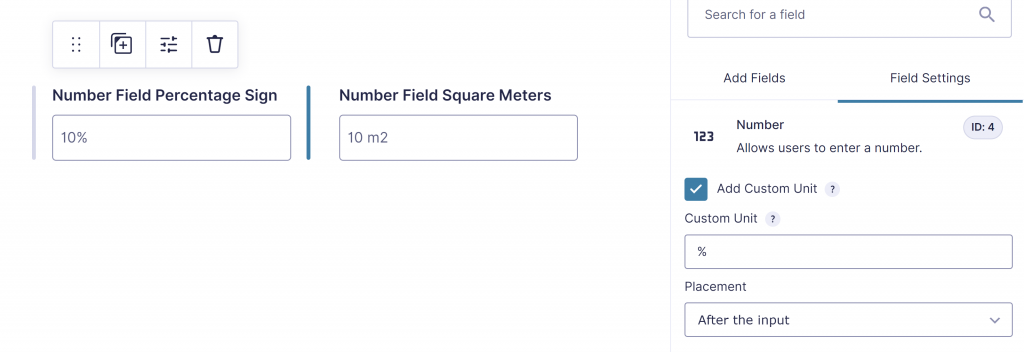
- Custom Unit: You can add a Custom Unit. This is an open input-field, where you can customize your Custom Unit, like percentage sign (%), certain metrics (like square meter m² or square feet ft²), cooking metrics (like gram or tbs.) or other custom units.
- Placement: you can add the Custom Unit Before or After the input with the dropdown in the Gravity Forms Number Field Settings.
See for more inspiration the Tutorial Custom Units (%, m2) for Gravity Forms Number Field.
How the custom unit works
- The unit is placed directly before or after the number, depending on Placement.
- When the visitor clicks in the field to type, the unit is removed, and it is added again when the visitor leaves the field. Read-only fields always show the unit.
- The unit is not saved in the entry and is not used in calculations: the entry stores the plain number. The unit is shown again in the entry list, the entry details, field merge tags without a modifier, GravityView and Gravity PDF.
- With Show as Slider, the unit is shown in the slider output next to the slider.
Custom units and the Currency format
Add Custom Unit is not available for fields with the Currency number format. The checkbox is disabled, and when you change the Number Format of a field to Currency, a custom unit that was set is switched off.
:numeric modifier
If you want the number string with custom unit or currency value as a decimal-formatted number, you can use the :numeric modifier like this:
{Numberfield with custom unit:1:numeric}
A merge tag with any modifier returns the Gravity Forms value without the custom unit. See Formatted values in entries, merge tags, GravityView and Gravity PDF.
Read more about modifiers in the Gravity Forms documentation.