OAuth 2.0 Client Credentials in GravityWP API Connector
OAuth 2.0 Client Credentials is an authentication flow designed for server-to-server access. It is used when an API provider allows your site to authenticate using a Client ID and Client Secret, then exchange those credentials for an access token via a Token URL.
Unlike OAuth 2.0 Authorization Code, Client Credentials does not use a consent screen, and it does not require a redirect URL (callback URL). There is no user approval step. Your site simply requests a token directly from the provider.
This method is common for platforms that support “machine” or “service” authentication, including many CRM-style tools, internal APIs, and systems that issue server tokens for integrations.
When to use OAuth 2.0 Client Credentials
Use OAuth 2.0 (Client Credentials) when an API provider:
- gives you a Client ID and Client Secret
- provides a Token URL used to request an access token
- does not require a user to log in and approve access
- describes its OAuth setup as server-to-server, machine-to-machine, or client credentials flow
If the provider gives you a single static token (that you paste once), a Bearer Token connection is usually the better fit.
If the provider requires a consent screen and a redirect URL (callback URL), use OAuth 2.0 (Authorization Code) instead.
What API Connector needs for Client Credentials
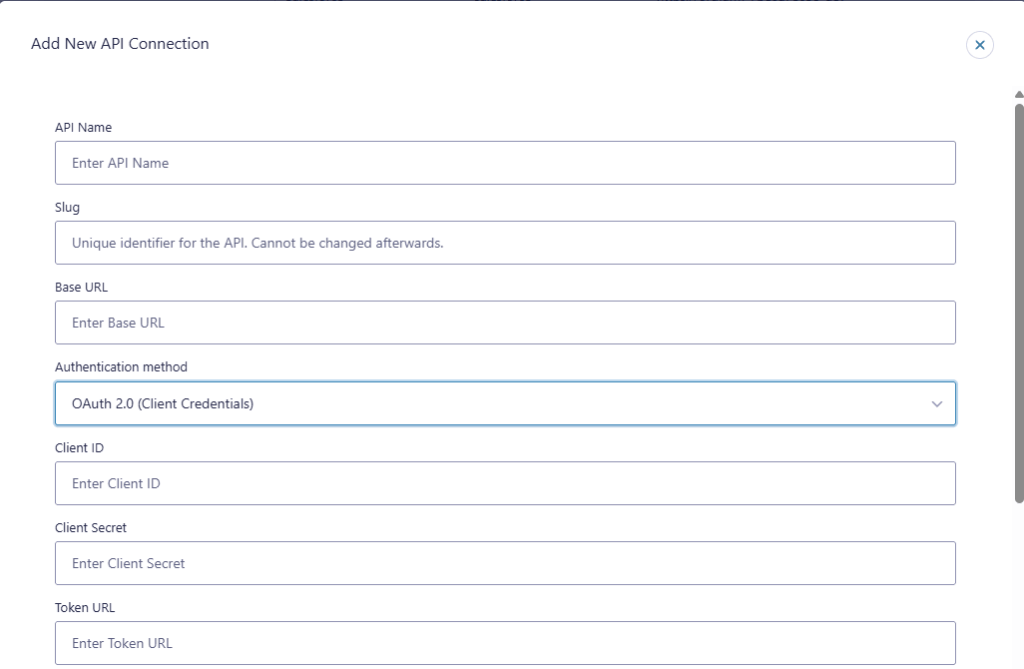
When you choose OAuth 2.0 (Client Credentials) in API Connector, the connection editor includes these fields:
- API Name
- Slug
- Base URL
- Authentication method
- Client ID
- Client Secret
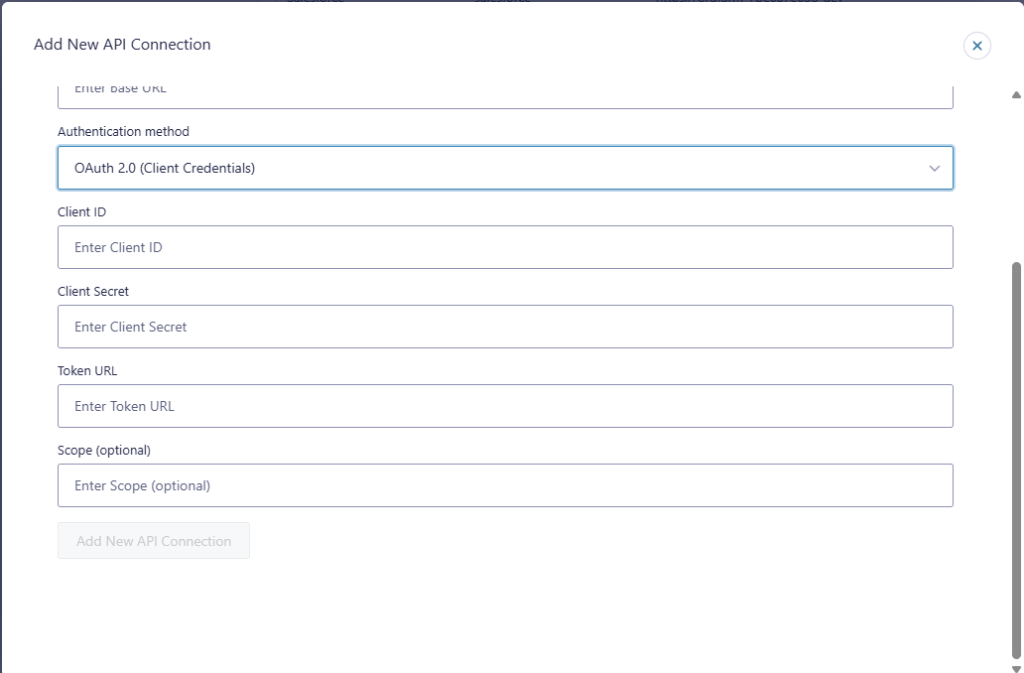
- Token URL
- Scope (optional)
Key terms
Client ID
A public identifier for your integration app (created in the provider’s developer portal).
Client Secret
A private value paired with the Client ID. Treat it like a password.
Base URL
The base domain for API requests. API Connector uses this as the starting point, and your feed endpoints are typically written as paths relative to it.
Token URL
The provider endpoint used to exchange your client credentials for an access token.
Scope (optional)
A permission string that limits what the token can access. Some providers require scopes. Others ignore the field or use a different permission model.
How OAuth 2.0 Client Credentials works in API Connector
In API Connector, this authentication method is used inside the feed, meaning:
- Your feed runs (GET, POST, etc.).
- API Connector requests an access token from the Token URL using the Client ID and Client Secret.
- API Connector sends the API request using the access token.
Because of that, you typically won’t “authorize” the connection in the browser. The token request happens when the feed executes.
Create an OAuth 2.0 Client Credentials connection
Go to the API Connector settings page in WordPress and add a new API connection.
Fill in the fields using the values from your provider’s OAuth documentation or developer settings:
- API Name: a label that helps you recognize the connection later
- Slug: a unique identifier for this connection (cannot be changed after saving)
- Base URL: the API base domain you want to call
- Authentication method: OAuth 2.0 (Client Credentials)
- Client ID: from your provider app settings
- Client Secret: from your provider app settings
- Token URL: from your provider’s OAuth documentation
- Scope (optional): only if your provider requires it
Token URL and Scope for Client Credentials
Token URL
The Token URL is the endpoint the provider uses to issue access tokens. This is not the same as the API base URL. Many providers host token endpoints on a dedicated OAuth path.
What matters here is accuracy. A wrong Token URL usually causes token errors (for example, invalid client, unauthorized, or unexpected response).
Scope (optional)
The Scope field is optional because not all providers use scopes in the same way.
- If your provider lists required scopes in their docs, add them exactly as written.
- If your provider does not mention scopes for client credentials, leave it blank.
Using a Client Credentials connection in a feed
Once the connection is saved, use it in an API Connector feed (per form):
- Go to Forms → your form → Settings → API Connector
- Add a new feed and select the connection you created
- Choose your request type (GET, POST, etc.)
- Add the endpoint path and any parameters needed
- Save the feed and run a test submission
Because Client Credentials authentication happens when the feed runs, token and permission problems usually show up during testing. That is expected.
For feed configuration details (endpoint, headers, query string/body params, field mapping), refer to API feed settings documentation.
Common use cases
OAuth 2.0 Client Credentials is often used for:
- Server-to-server integrations where no user approval is required
- Internal tools and data services that issue tokens for machine access
- CRM-style platforms that provide “legacy keys/apps” or server app credentials and allow token exchange via client credentials
- Automations where Gravity Forms submissions trigger an API request (or where a feed pulls data on submission)
Security and maintenance notes
- Treat the Client Secret like a password. Limit access to administrators only.
- Use the smallest permission set available. If the provider supports scopes, request only what the integration needs.
- If credentials are rotated or regenerated in the provider, update the connection fields in API Connector.
- If the provider changes required scopes or token rules, update them and re-test the feed.
Troubleshooting OAuth 2.0 Client Credentials
Token request fails (invalid_client, unauthorized, or similar)
Most often caused by one of these:
- Client ID or Client Secret is wrong (or copied with extra spaces)
- Token URL is incorrect
- The provider app is disabled or credentials were rotated
Scope errors (invalid_scope, insufficient_scope, permission denied)
Check:
- The scope value matches the provider docs exactly
- The provider app is allowed to request that scope
- You requested more permissions than your app is approved to use
Feed runs but returns 401 or 403
This usually means:
- a token was issued but does not have permission for the endpoint you are calling
- the endpoint requires additional permissions not included in your app configuration
Related documentation
OAuth 2.0 Client Credentials – FAQ
No. OAuth 2.0 Client Credentials does not use a browser redirect flow.
The token request happens when the feed runs, right before the API request is sent.
Only add scopes if your provider requires them. If the provider does not mention scopes for Client Credentials, leave it blank.
No. Bearer Token uses a token you paste. Client Credentials requests a token from a Token URL using your Client ID and Client Secret.