Basic Authentication in GravityWP API Connector
Basic Authentication is an HTTP authentication method that uses a username and password to access a protected API. Many older or internal APIs still use it because it’s simple to implement and easy to test.
In API Connector, you can create a Basic Auth API connection once, then reuse it across multiple API feeds.
When to use Basic Authentication
Use Basic Authentication when your API provider gives you:
- a username and password, or
- credentials that behave like a username/password pair (common in older systems)
If your provider gives you a single token value (often starting with pat-, sk-, or similar), Bearer Token is usually the better fit.
If your provider requires a consent screen and a redirect URL, you likely need OAuth 2.0 Authorization Code instead.
How Basic Authentication works
With Basic Authentication:
- The client (your site) sends a username and password with the request.
- The credentials are typically sent using the HTTP Authorization header with the Basic scheme.
- The credentials are encoded using Base64, which is not encryption (it’s just encoding).
In API Connector, Basic Authentication is applied automatically when a feed uses a Basic Auth connection.
Important security note: Because the credentials are not encrypted by Basic Auth itself, Basic Auth should be used over HTTPS so the connection is protected in transit.
What you need before you start
- WordPress with Gravity Forms installed
- GravityWP API Connector installed and activated
- API provider details:
- Base URL
- Username
- Password
- Base URL
Create a Basic Authentication API connection
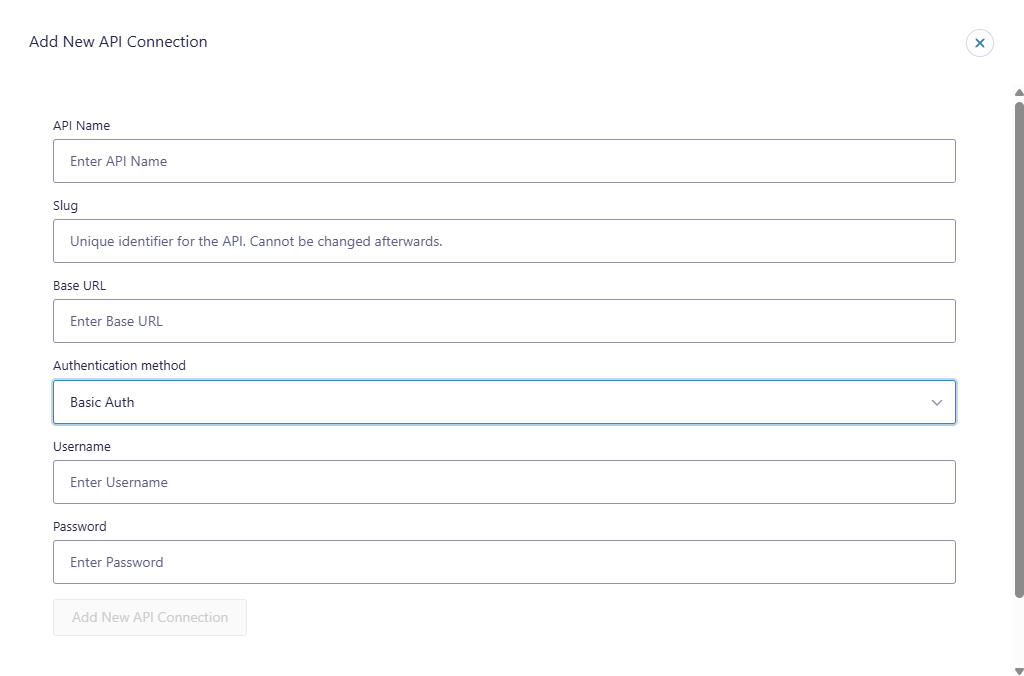
Go to the API Connector settings area in your WordPress admin and add a new API connection.
Fill in these fields:
- API Name
A label to recognize the connection later (example: Internal CRM – Basic Auth). - Slug
A unique identifier for the connection. (This can’t be changed later.) - Base URL
The root domain of the API you want to call (example: https://api.example.com). - Authentication method
Select Basic Auth. - Username / Password
Enter the credentials provided by your API provider.
After saving, this connection becomes available inside API feeds so you can run authenticated requests without re-entering credentials every time.
Use the Basic Auth connection in an API feed
Once the connection is saved, you use it inside an API feed:
- Go to Forms → (your form) → Settings → API Connector
- Click Add New Feed
- Select your Basic Auth connection
- Choose your request method (GET/POST/etc.) and configure the endpoint, parameters, and mappings as needed
API Connector will use the authentication method from the selected connection when the feed runs.
If the request fails, confirm the endpoint supports Basic Auth and that the credentials are correct.
Common use cases
Basic Authentication is commonly used for:
- Internal business systems with a simple login requirement
- Legacy CRMs or databases that still use username/password access
- Private APIs behind a gateway that expects Basic Auth credentials
Security and maintenance notes
- For Basic Authentication, HTTPS is strongly recommended because the credentials are only encoded, not encrypted.
- Use HTTPS whenever possible. Basic Auth credentials are not encrypted by the scheme itself.
- Treat credentials like admin passwords. Only trusted site admins should have access to API Connector settings.
- Use least privilege if your provider supports it. Some systems let you create “read-only” users. Prefer those for lookups.
Troubleshooting
401 Unauthorized / Invalid credentials
- Confirm the username and password are correct.
- Check whether the provider expects:
- a special username format, or
- an API-generated password instead of the account password
- a special username format, or
403 Forbidden
- The credentials are valid, but the user does not have permission for that endpoint.
- Confirm the user has access rights for the specific resource you are calling.
Works in Postman but not in API Connector
- Compare the Base URL + endpoint path.
- Double-check the API requires Basic Auth, not Bearer Token.
- Confirm you’re calling the same exact URL and method.
Related documentation
FAQ
Basic Authentication is a username/password method used to authenticate API requests. API Connector supports it as a connection type so you can reuse the same credentials across feeds.
It can be secure when used over HTTPS. The credentials are Base64-encoded, not encrypted, so HTTPS is important to protect them in transit.
Use Bearer Token when your provider gives you one token value (a single secret string) instead of a username/password pair.
No. You select the Basic Auth connection in the feed. The feed uses the connection’s authentication method automatically.