Bearer Token Authentication in GravityWP API Connector
Bearer Token authentication is a simple way to authenticate API requests using an access token. Instead of using an OAuth consent flow, you paste a token provided by your API service, and API Connector uses it to authenticate requests made by API feeds.
Bearer tokens are commonly used when an API provider gives you a ready-to-use token, such as a personal access token, private app token, or API access token. In most APIs, bearer tokens are sent in the HTTP Authorization header using the Bearer scheme.
When to use Bearer Token authentication
Use Bearer Token when the API provider:
- Gives you a single token you can copy and paste
- Does not require a browser-based consent screen
- Does not require a redirect URL (callback URL)
- Does not require exchanging codes for tokens
If the provider requires a consent screen, redirect URL, and client credentials, use OAuth 2.0 Authorization Code instead. If the provider supports server-to-server OAuth without a consent screen, use OAuth 2.0 Client Credentials.
Key terms
Bearer token
A token that grants access to an API to whoever has it. If someone else gets the token, they can usually use it too, so it must be stored and shared carefully.
Authorization header
A standard place where APIs expect authentication details. Many APIs expect a header like Authorization: Bearer <token>.
Base URL
The “root” address of the API. API feeds call endpoints under this base URL.
Create a Bearer Token connection in API Connector
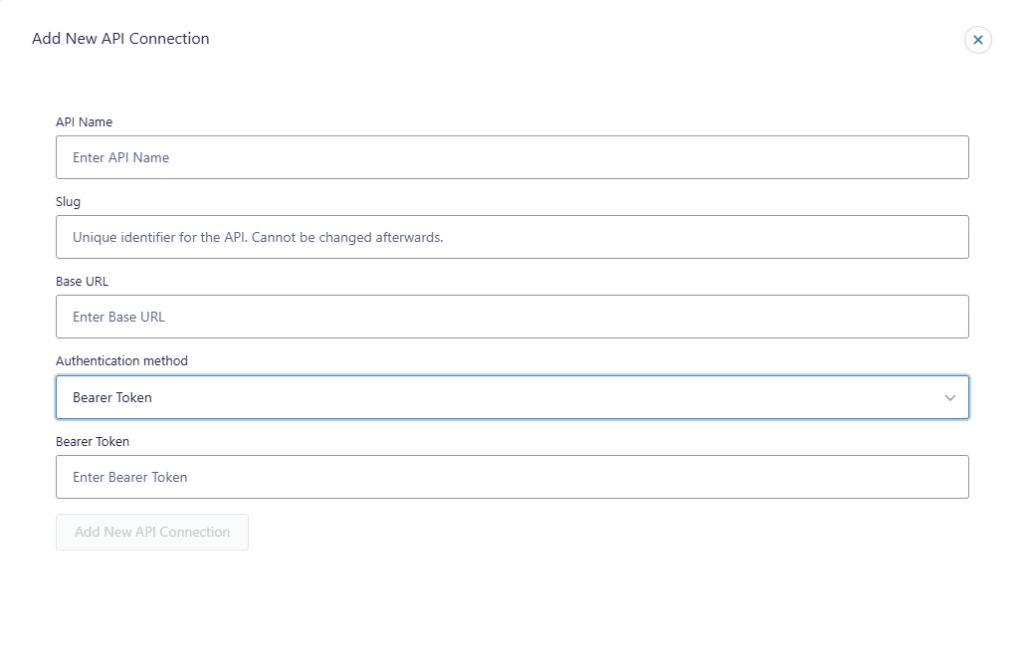
Go to your API Connector settings in WordPress, then add a new API connection.
Fill in these fields:
- API Name: A clear label you will recognize later (example: “CRM API”)
- Slug: A unique identifier (cannot be changed after saving)
- Base URL: The API’s base domain (example format: https://api.example.com)
- Authentication method: Bearer Token
- Bearer Token: Paste the token provided by your API service
How Bearer Token connections are used in feeds
Once saved, the Bearer Token connection becomes available when creating an API feed.
In your form’s API feed, you will typically set:
- Connection: Select the Bearer Token connection you created
- Request method: GET, POST, PATCH, or DELETE (depending on your API)
- Endpoint: The path you want to call (relative to the Base URL)
- Headers / Query parameters / Body: Depending on what the API requires
- Field mapping: Map values from the API response into Gravity Forms fields
If an API request returns JSON, you can map response paths into fields, and optionally store the raw response for debugging.
Common use cases
Bearer Token authentication is commonly used for:
- Contact lookups or record retrieval (GET)
- Sending form submissions to an external system (POST)
- Updating an existing record (PATCH)
- Deleting a record (DELETE), if the API allows it
It is especially useful when an API provider offers a “token-based” setup instead of OAuth.
Security and maintenance notes
- Treat bearer tokens like passwords. Anyone who has the token may be able to access the API.
- Limit admin access. Only trusted administrators should manage API connections.
- Rotate tokens if exposed. If a token is ever shared publicly or saved in an unsafe place, revoke it in the provider and generate a new one.
- Prefer least-privilege tokens. If the provider supports scoped tokens, request only what the site needs.
Troubleshooting
401 Unauthorized or “Invalid token”
Common causes:
- Token is expired or revoked
- Token was copied incorrectly (missing characters)
- The API expects a different authentication method than Bearer Token
Fix:
- Generate a new token in the API provider
- Paste it again in the Bearer Token field
- Re-test the feed request
403 Forbidden
Common causes:
- Token is valid, but lacks permission for the endpoint
Fix:
- Check the permissions/scopes assigned to the token in the provider
- Use a token with the correct access level
Works in one endpoint but fails in another
Common causes:
- The failing endpoint requires extra permissions
- The failing endpoint requires extra headers or parameters
Fix:
- Compare required headers/parameters in the API provider’s docs
- Add required headers or query parameters in the feed
Related documentation
FAQ
Most APIs use the Bearer scheme in the request header, but in API Connector you typically paste the token value itself, and the authentication method handles the “Bearer” scheme for you. If a specific API provider explicitly requires a different format, follow that provider’s requirement.
OAuth is generally more secure than Bearer Token authentication, especially when Bearer Tokens are long-lived and manually copied into a site. OAuth can limit access with scopes, issue short-lived tokens, and avoid pasting permanent credentials into WordPress.
Bearer Token authentication can still be appropriate for APIs that only provide token-based access, but it relies heavily on protecting that token and rotating it if it’s ever exposed.
If your provider issues tokens that expire, generate a new token in the provider and replace the value in the API connection.