Zapier is usually the simpler choice when you want a fully managed automation platform, a large library of ready-made app connections, and less infrastructure to manage. n8n is often a better fit when you need self-hosting, deeper API or code control, or workflows with more technical logic.
Neither platform is always cheaper, safer, or better. The right choice depends on the apps you use, how often workflows run, how complex they are, where you want data and workflow infrastructure to live, and who will maintain the automation.
| Quick verdict: Choose Zapier if you value fast setup, managed infrastructure, and broad app coverage. Choose n8n if self-hosting, custom APIs, code, or more technical workflow control matter more. Compare the real workflow you plan to run before choosing on price alone. |
n8n vs Zapier at a Glance
| Comparison point | Zapier | n8n |
| Deployment | Managed cloud platform | n8n Cloud or self-hosted |
| Main billing unit | Tasks; rates vary for some products and actions | Workflow executions on paid plans |
| App ecosystem | 9,000+ apps in Zapier’s app ecosystem | Built-in integrations, community nodes, custom nodes, and API requests |
| Workflow style | Trigger-and-action Zaps with visual logic | Node-based workflows with visual logic, APIs, and code |
| Self-hosting | No public self-hosted product plan | Available through Community and paid self-hosted editions |
| AI direction | AI by Zapier, tools, Copilot, and agentic workflows | AI agents plus n8n Assistant in preview |
| Operations | Zapier manages the platform infrastructure | n8n manages Cloud; self-hosters manage their own environment |
| Good fit when | You want fast setup and broad ready-made connectivity | You need more deployment, API, or workflow control |
How Do n8n and Zapier Work Differently?
Zapier builds automations as Zaps. A Zap starts with a trigger and can continue with one or more actions. Paid plans support multi-step Zaps, and Zapier also provides built-in logic such as filters and paths. The platform is designed to keep setup inside a managed service, so users do not have to run the automation server themselves.
n8n builds automations as workflows made of connected nodes. A workflow can combine triggers, app actions, conditional logic, loops, webhooks, API requests, and code. n8n also offers n8n Cloud and self-hosted options.
The practical difference is not that one can automate and the other cannot. Both can automate multi-step work. The difference is how much infrastructure, app setup, custom logic, and code you want to handle yourself.
n8n and Zapier Pricing: Tasks vs Workflow Executions
| Pricing checked: September 10, 2026Prices and plan limits can change. Verify the official pricing pages again before publishing or after any later update. |
How does Zapier pricing work?
Zapier uses a task-based model. Its task-usage documentation says a standard successful action step uses one task. Triggers do not use tasks, and filters or paths do not use tasks. Some Zapier products use different rates, including AI by Zapier, extended Code by Zapier runtime, Lead Router, and Zapier MCP.
At the time of this check, the Zapier pricing page listed a Free plan with 100 tasks per month, Professional starting at $19.99 per month, Team starting at $69 per month, and Enterprise with custom pricing. Exact cost changes with the task tier and billing term.
How does n8n pricing work?
n8n prices its paid plans around workflow executions. Its pricing page defines an execution as one run of the full workflow, regardless of how many steps are inside that workflow.
- Starter: €20 per month when billed annually, with 2,500 workflow executions and unlimited steps.
- Pro: €50 per month when billed annually, with 10,000 workflow executions and unlimited steps.
- Business: €667 per month when billed annually, self-hosted, with 40,000 workflow executions.
- Enterprise: custom execution volume and pricing; available as n8n-hosted or self-hosted.
n8n also publishes a standard self-hosted Community Edition. Its Sustainable Use License allows internal business use but restricts some commercial uses, such as selling hosted access to n8n without a separate agreement.
A simple billing-unit example
Assume one automation runs 10,000 times in a month and performs three standard successful action steps each time.
- Zapier: 10,000 runs × 3 standard one-task actions = 30,000 tasks.
- n8n: if the same outcome runs as one n8n workflow per event, that is 10,000 workflow executions, even if the workflow contains several steps.
This example compares billing units, not the final bill. Actual cost depends on the plan, task or execution tier, AI or code usage, self-hosting costs, and the workflow design.
If cost is the main reason you are considering n8n, test one real workflow and compare actual usage before migrating. A simple Zap can remain inexpensive, while a complex or high-volume workflow can behave very differently under each pricing model.
Which Has More Integrations and Workflow Flexibility?
Its current app directory lists 9,000+ apps. That makes Zapier attractive when your main goal is to connect popular SaaS tools with minimal setup.
n8n takes a more technical route. Its paid plans include all integrations, while its developer tools include JavaScript and Python code steps, custom API requests, webhooks, and custom nodes on self-hosted instances. The HTTP Request node can call an API directly when a dedicated node does not cover the operation you need.
n8n also supports community nodes. That can extend what the platform connects to, but the n8n community-node security guidance warns that unverified community code can access workflow data and the machine running n8n. Treat community nodes like third-party software and review them before installation.
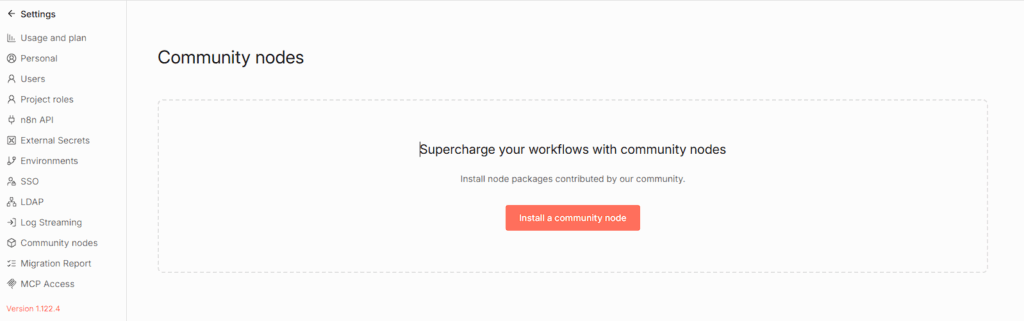
| Practical decisionChoose Zapier when a polished native app connection already covers the workflow. Choose n8n when direct API access, custom logic, code, or self-hosted extensions are important to the design. |
Is n8n Safer Than Zapier?
Not automatically. Self-hosting gives you more control over the n8n environment, but it also gives you more security work.
Zapier documents a managed AWS environment in the United States, encryption in transit and at rest, annual SOC 2 Type II audits, SOC 3 reporting, and enterprise access controls. See Zapier’s Security and Compliance page for the current controls and certifications.
n8n Cloud is hosted on Microsoft Azure in the European Union and encrypts Cloud data at rest and in transit. For self-hosted n8n, the n8n security page states that the operator is responsible for TLS and encryption at rest.
Self-hosting can help an organization choose where the n8n instance and its database run. It does not mean workflow data can never leave your infrastructure. If a workflow sends data to a CRM, AI provider, email service, or another external API, that service receives the data required for the request.
If data location matters, n8n gives you more deployment choice. If you want the automation platform itself managed for you, Zapier removes much of the server and patching work. The safer option depends on your security controls, connected services, and operational capability.
Which Is Easier to Use?
Zapier is built around a managed visual editor, ready-made app connections, templates, and no-code workflow steps. You choose a trigger, connect an account, add actions, test the Zap, and turn it on. For teams that want fewer infrastructure decisions, that model reduces setup work.
n8n also has a visual workflow editor, but it exposes more technical detail. Users can inspect structured data, write expressions, call APIs, add code, and decide how a self-hosted instance is deployed. n8n Cloud removes the server-management part, while self-hosting adds it back.
That does not mean n8n is only for developers or Zapier is only for beginners. A better rule is to match the tool to the workflow and the team. A non-technical team may prefer Zapier for common SaaS connections. A technical team may accept more setup in exchange for n8n’s workflow and deployment options.
How Do n8n and Zapier Compare for AI Automation?
Both platforms now treat AI as part of workflow automation rather than as a separate add-on idea.
Zapier’s current AI by Zapier documentation lets a Zap use supported AI models inside a workflow. Zapier also allows tools to be added to an AI by Zapier step. According to its tool documentation, those tools create agentic workflows that can reason and take actions across connected apps. Zapier is also migrating standalone Agents functionality into AI by Zapier.
n8n supports AI agents and AI-focused workflow components. On September 9, 2026, n8n introduced n8n Assistant in preview. n8n says the Assistant can plan, build, run, debug, and improve workflows, and that it supersedes the previous AI Workflow Builder.
The main choice is still workflow design. Zapier can be a strong fit when AI needs to act across many ready-made app connections. n8n can be a strong fit when AI sits inside a more technical workflow that also uses APIs, code, custom logic, or self-hosted infrastructure.
When Should You Choose Zapier?
Zapier is a practical choice when most of these statements are true:
- The apps you need already have strong Zapier integrations.
- You want a managed platform and do not want to maintain an automation server.
- Your team prefers a visual, no-code-first workflow builder.
- Your automation is easier to manage as standard triggers, actions, filters, and paths.
- Your expected task usage fits a Zapier plan you are comfortable paying for.
The key advantage is convenience. If a native integration already does what you need, there may be little value in adding more infrastructure or custom code.
When Should You Choose n8n?
n8n is a practical choice when several of these statements are true:
- You need the option to self-host the automation platform.
- Your workflows depend on custom APIs, HTTP requests, code, or detailed branching.
- You have technical people who can support more advanced workflow design or self-hosting.
- Execution-based pricing matches your workload better than task-based pricing.
- You want more control over where the n8n instance and its database run.
- You may need custom or community nodes after reviewing their security risks.
Self-hosting is not a shortcut around operations. If you choose that route, plan for updates, backups, TLS, storage encryption, monitoring, and recovery.
Should You Switch From Zapier to n8n?
Do not migrate every workflow at once. Test one workflow that is expensive, complex, or difficult to maintain, then compare the same business outcome in both platforms.
- Choose one existing Zap and record what it does, how often it runs, and which steps consume tasks.
- Rebuild the same outcome in n8n without adding extra features at first.
- Run the same test inputs through both versions and confirm that the outputs match.
- Compare actual Zapier task usage with n8n execution usage. Include hosting and maintenance time if n8n is self-hosted.
- Compare failure handling, logs, app support, maintainability, and who can safely edit the workflow.
- Move more workflows only if the test gives you a clear operational, cost, or control benefit.
If you are still deciding how to run n8n, GravityWP has an overview of how to set up an n8n instance. For production self-hosting, the Docker on a VPS guide covers the main architecture. Review those target pages for their own scheduled technical updates before publishing this revamp.
For temporary local webhook testing, GravityWP also has a Cloudflare Tunnel n8n guide. Publish this internal link only after the target guide’s `cloudflared tunnel –url` command has been corrected and copy-tested.
Using Gravity Forms?
This page is the broad platform comparison. If your main question is how the two platforms fit Gravity Forms, use the dedicated Gravity Forms-specific n8n and Zapier comparison. It covers the form-specific setup and decision points without turning this article into a Gravity Forms tutorial.
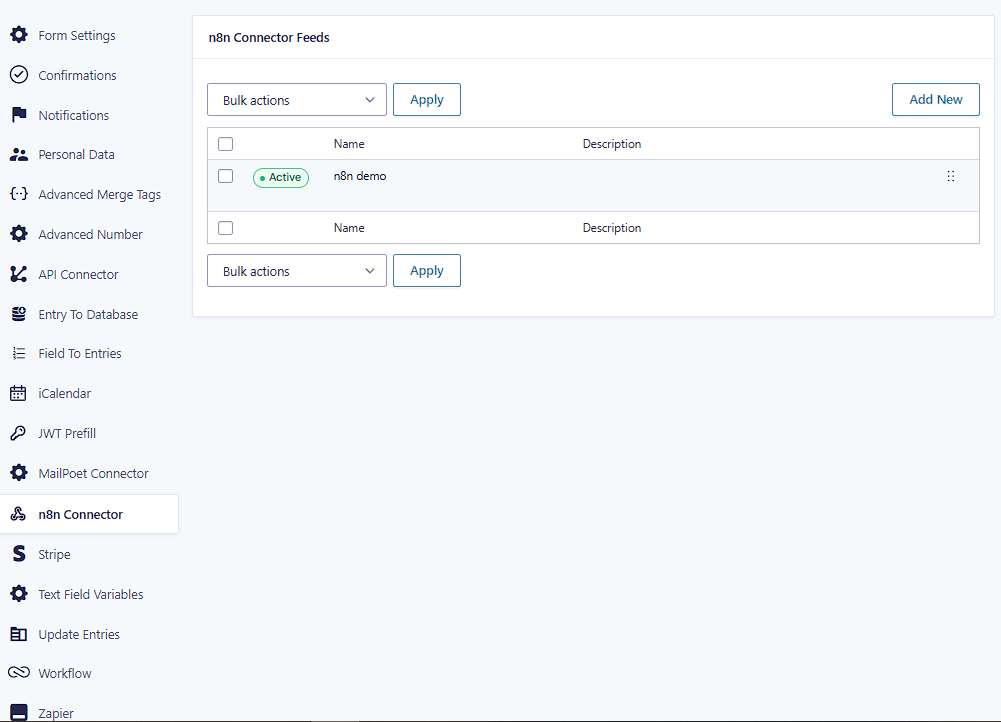
If you choose n8n, the GravityWP n8n Connector can send Gravity Forms submissions to n8n through webhooks and map supported responses back to the original entry. For a migration example, see How to Replace Zapier with n8n for Gravity Forms.
Conclusion: Which Automation Platform Fits Your Workflow?
For a broad automation-platform decision, start with the operating model rather than the brand name.
- Choose Zapier when you want managed infrastructure, broad ready-made app coverage, and fast setup for common business workflows.
- Choose n8n when you need self-hosting, custom APIs or code, more technical workflow control, or an execution-based pricing model that suits your workload.
Then test the workflow that matters most. Compare the real inputs, outputs, task or execution usage, failure handling, and maintenance work. That gives you a better answer than choosing a permanent winner from a feature list.
n8n and Zapier FAQ
Sometimes, but not always. n8n and Zapier bill in different units, and self-hosted n8n also has infrastructure and maintenance costs. Compare one real workflow using your expected monthly volume instead of comparing only entry prices.
Zapier publishes managed cloud plans and documents AWS hosting in the United States. Its public pricing does not list a self-hosted Zapier edition. Enterprise features include options such as VPC peering for secure connections to internal data sources, but Zapier still operates the automation platform.
It depends on the workflow. Zapier removes server management and emphasizes ready-made app connections. n8n Cloud also removes server management, but n8n exposes more API, code, and workflow controls. Self-hosted n8n adds infrastructure work on top of workflow building.
Both support AI automation. Zapier is useful when AI needs to act across a very large app ecosystem. n8n is useful when AI needs to sit inside workflows with custom APIs, code, technical branching, or self-hosted infrastructure. The better choice depends on the workflow, not the AI label alone.
Our Premium add-ons for Gravity Forms

JWT Prefill
Fill forms with data you can trust. Prefill Gravity Forms fields with a secure token instead of links with editable url parameters, so your data is accurate, tamper-proof, and ready to use.
List Datepicker
Add a Datepicker with calendar select to a column or multiple columns in a Gravity Forms List Field.

List Dropdown
Add a Dropdown Select with choices to a column or multiple columns in a Gravity Forms List Field.
Advanced Number Field
Functionality for Number Fields, like rounding or only absolute numbers, fixed point notation, range calculation, custom units like % or m2 & show as slider.
Read tutorials about
How to Validate Repeatable Contact Rows in Gravity Forms
Learn how to validate repeatable Gravity Forms List field rows with GravityWP List Text. This tutorial shows how to add email and regex validation, test invalid values, and confirm that valid team roster data is stored correctly.

Gravity Forms Airtable Integration: Create Records From Form Submissions
Learn how to build a Gravity Forms Airtable integration with GravityWP API Connector. Send form submissions to Airtable, create new records automatically, and save the returned Airtable Record ID and response back to Gravity Forms.

Gravity Forms Asana Integration: Create Tasks From Form Submissions
Learn how to connect Gravity Forms to Asana with GravityWP API Connector. This tested workflow creates Asana tasks from form submissions and saves the returned task ID and URL back to Gravity Forms.

Gravity Forms Google Calendar Integration: Create Events From Form Submissions
Connect Gravity Forms to Google Calendar with GravityWP API Connector. Learn how to create calendar events from form submissions, map event details, configure OAuth 2.0, handle time zones, and save the returned Event ID and URL.