This guide shows how to run n8n on an Ubuntu VPS with Docker Compose and PostgreSQL. You will also configure persistent storage, HTTPS, and a reverse proxy. Then, you will check firewall exposure, backups, updates, logs, and webhooks.
Self-hosting gives you more control over the server and deployment. It also makes you responsible for security, updates, backups, and recovery. n8n recommends self-hosting for users who are comfortable managing servers and containers. If you do not want that work, n8n Cloud is the simpler route.
Configuration checked: September 13, 2026. At the time of this review, n8n 2.38.6 was the stable release. Pin the version you deploy. Recheck the stable release before each update.
Already comparing hosting options? See GravityWP’s n8n setup overview for n8n Cloud, one-click hosting, and raw VPS options.
What Does This n8n Docker VPS Setup Include?
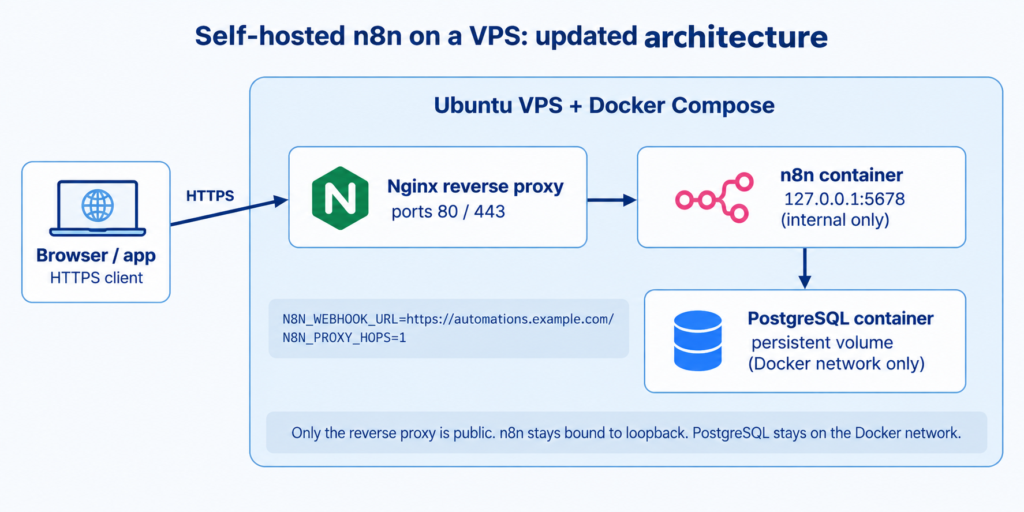
This is a do-it-yourself deployment. Docker Compose runs the application and database, while Nginx handles the public HTTPS connection.
| Component | Role | Public exposure |
|---|---|---|
| Ubuntu VPS | Runs Docker Engine, Docker Compose, Nginx, and the containers | SSH plus ports 80/443 as required |
| Nginx reverse proxy | Terminates HTTPS and forwards requests to n8n | Public on 80/443 |
| n8n container | Runs the editor, triggers, and workflows | Bound to 127.0.0.1:5678 in this guide |
| PostgreSQL container | Stores n8n application data in this setup | Docker network only |
| Docker volumes | Persist n8n and PostgreSQL data | Not network-exposed |
What Do You Need Before You Self-Host n8n?
- A supported 64-bit Ubuntu VPS. Docker currently documents Ubuntu 24.04 LTS and 22.04 LTS among its supported Ubuntu releases.
- A domain or subdomain such as automations.example.com.
- SSH access and a user with sudo privileges.
- Choose enough CPU, RAM, and disk for your workflows, execution volume, database, and logs. A fixed “small VPS” size will not fit every workload.
- A separate place for backups. A Docker volume on the same VPS is persistence, not an off-server backup.
This guide keeps PostgreSQL 15 for the example. It is still a supported major release as of September 2026. PostgreSQL lists version 15 as supported through November 2027. Do not upgrade an existing database by only changing the image tag. A major PostgreSQL upgrade needs a dump/reload or another supported migration method.
How Do You Install Docker and Docker Compose on Ubuntu?
For a production-oriented VPS, use Docker’s official Ubuntu apt repository. Docker says the convenience script at get.docker.com is for testing and development. Docker does not recommend that script for production environments.
sudo apt update
sudo apt install -y ca-certificates curl
sudo install -m 0755 -d /etc/apt/keyrings
sudo curl -fsSL https://download.docker.com/linux/ubuntu/gpg \
  -o /etc/apt/keyrings/docker.asc
sudo chmod a+r /etc/apt/keyrings/docker.asc

sudo tee /etc/apt/sources.list.d/docker.sources <<EOF
Types: deb
URIs: https://download.docker.com/linux/ubuntu
Suites: $(. /etc/os-release && \
  echo "${UBUNTU_CODENAME:-$VERSION_CODENAME}")
Components: stable
Architectures: $(dpkg --print-architecture)
Signed-By: /etc/apt/keyrings/docker.asc
EOF

sudo apt update
sudo apt install -y docker-ce docker-ce-cli containerd.io \
  docker-buildx-plugin docker-compose-plugin
sudo docker run hello-world
docker --version
docker compose version
Optional: run Docker without sudo.
The docker group lets a user run Docker commands without sudo. Docker warns that this group grants root-level privileges. Only add trusted administrative users.
sudo usermod -aG docker “$USER”
# Log out and back in before relying on the new group membership.
How Do You Create the n8n Project Directory and .env File?
mkdir -p ~/n8n-vps
cd ~/n8n-vps
nano .env
Use the .env file for values that change between deployments. Protect this file because it contains secrets. Keep it out of version control and back it up securely.
# Pin the n8n version checked for this article
N8N_VERSION=2.38.6

# Public URL
N8N_HOST=automations.example.com
N8N_PORT=5678
N8N_PROTOCOL=https
N8N_WEBHOOK_URL=https://automations.example.com/
N8N_PROXY_HOPS=1

# Timezone
GENERIC_TIMEZONE=Asia/Manila
TZ=Asia/Manila

# Keep this value stable and secret
N8N_ENCRYPTION_KEY=replace_with_a_long_random_value

# PostgreSQL
POSTGRES_DB=n8n
POSTGRES_USER=n8n
POSTGRES_PASSWORD=replace_with_a_strong_database_password
Generate a random encryption key, for example:
openssl rand -hex 32
The important webhook setting is N8N_WEBHOOK_URL. n8n documents it for reverse-proxy setups. It replaces the older WEBHOOK_URL variable, which is deprecated from n8n 2.35.0. For one reverse proxy, set N8N_PROXY_HOPS=1.
How Do You Write the Docker Compose File for n8n and PostgreSQL?
Create compose.yaml. Modern Docker Compose uses the Compose Specification. This example therefore omits the obsolete top-level version: “3.8” field.
nano compose.yaml
services:
  postgres:
    image: postgres:15
    restart: unless-stopped
    environment:
      POSTGRES_DB: ${POSTGRES_DB}
      POSTGRES_USER: ${POSTGRES_USER}
      POSTGRES_PASSWORD: ${POSTGRES_PASSWORD}
    volumes:
      - postgres_data:/var/lib/postgresql/data
    healthcheck:
      test: ["CMD-SHELL", "pg_isready -U ${POSTGRES_USER} -d ${POSTGRES_DB}"]
      interval: 10s
      timeout: 5s
      retries: 5

  n8n:
    image: docker.n8n.io/n8nio/n8n:${N8N_VERSION}
    restart: unless-stopped
    depends_on:
      postgres:
        condition: service_healthy
    env_file:
      - .env
    environment:
      DB_TYPE: postgresdb
      DB_POSTGRESDB_HOST: postgres
      DB_POSTGRESDB_PORT: 5432
      DB_POSTGRESDB_DATABASE: ${POSTGRES_DB}
      DB_POSTGRESDB_USER: ${POSTGRES_USER}
      DB_POSTGRESDB_PASSWORD: ${POSTGRES_PASSWORD}
      DB_POSTGRESDB_SCHEMA: public
      N8N_ENFORCE_SETTINGS_FILE_PERMISSIONS: "true"
      NODE_ENV: production
    ports:
      - "127.0.0.1:5678:5678"
    volumes:
      - n8n_data:/home/node/.n8n
    logging:
      driver: local

volumes:
  n8n_data:
  postgres_data:
Why these details matter:
- The n8n image is pinned through N8N_VERSION instead of silently following a newer release.
- PostgreSQL has a health check. n8n waits for the database to become healthy before it starts.
- n8n is published only on 127.0.0.1:5678. The reverse proxy can reach it, but the port is not exposed on every host interface.
- The local Docker logging driver rotates logs by default. This reduces the risk of unbounded json-file logs filling the VPS disk.
- The n8n data volume persists instance data under /home/node/.n8n. PostgreSQL data uses its own volume.
How Do You Start the n8n Docker Compose Setup?
docker compose config
docker compose up -d
docker compose ps
Run docker compose config first to catch interpolation or YAML errors. Then start the containers. If a service is unhealthy, inspect its logs:
docker compose logs --tail=100 postgres
docker compose logs --tail=100 n8n
| Do not expose port 5678 to the public Internet just to complete the owner setup. Docker publishes mapped ports to all host interfaces by default unless you bind a specific host address. This guide binds n8n to 127.0.0.1 and finishes access through HTTPS. |
|---|
How Do You Add DNS, Nginx, HTTPS, and a Reverse Proxy?
Create an A record for your subdomain and point it to the VPS IP address. Then install Nginx and a TLS certificate. Certificate steps can vary by server. The reverse proxy must still pass the forwarded headers required by n8n.
sudo apt install -y nginx certbot python3-certbot-nginx
A minimal Nginx location for n8n should forward the host and proxy headers to the loopback-bound container:
server {
    listen 80;
    server_name automations.example.com;

    location / {
        proxy_pass http://127.0.0.1:5678;
        proxy_http_version 1.1;
        proxy_set_header Host $host;
        proxy_set_header X-Real-IP $remote_addr;
        proxy_set_header X-Forwarded-For $proxy_add_x_forwarded_for;
        proxy_set_header X-Forwarded-Host $host;
        proxy_set_header X-Forwarded-Proto $scheme;
        proxy_set_header Upgrade $http_upgrade;
        proxy_set_header Connection "upgrade";
    }
}
sudo nginx -t
sudo systemctl reload nginx
sudo certbot –nginx -d automations.example.com
After Certbot enables HTTPS, check the proxy headers again. Nginx should forward X-Forwarded-For, X-Forwarded-Host, and X-Forwarded-Proto. Together with N8N_WEBHOOK_URL and N8N_PROXY_HOPS=1, these settings let n8n generate the correct public webhook URL.
Should Port 5678 Be Publicly Exposed?
Not in this architecture. Docker warns that published container ports can bypass ufw or firewalld rules. A port published without a host IP also binds to all host interfaces by default. Bind 5678 to 127.0.0.1 instead. Nginx can still reach the n8n container, while the editor stays off the public Internet.
At the host firewall, allow only the services you actually need. A common Ubuntu pattern is SSH plus HTTP/HTTPS:
sudo ufw allow OpenSSH
sudo ufw allow ‘Nginx Full’
sudo ufw enable
sudo ufw status
If your server uses different firewall tooling, follow the documentation for that stack. Do not copy UFW rules blindly.
How Do You Verify the n8n Deployment?
This revamp is verified against documentation, not a new GravityWP staging deployment. Use the checklist below on your own VPS before you call the deployment ready:
- Open https://automations.example.com and confirm the n8n owner or sign-in screen loads over HTTPS.
- Create a small workflow with a Webhook node.
- Confirm the Production URL starts with your HTTPS domain rather than localhost or port 5678.
- Send a test request and confirm an execution appears in n8n.
- Restart the services with docker compose restart.
- Confirm the workflow still exists and the editor still loads.
- Trigger the webhook again after the restart.
If a webhook still points to an internal address, check N8N_WEBHOOK_URL and N8N_PROXY_HOPS again. Also check the X-Forwarded-* headers before you troubleshoot the workflow itself.
How Do You Back Up a Self-Hosted n8n Instance?
Back up three parts of the deployment: the database, the n8n data volume, and the configuration. Keep at least one copy off the VPS.
For PostgreSQL, use a logical dump as a portable backup. Load the values from .env first. Then write the dump outside the container:
set -a
source .env
set +a
mkdir -p backups
docker compose exec -T postgres pg_dump \
  -U "$POSTGRES_USER" -d "$POSTGRES_DB" \
  > "backups/n8n-$(date +%F).sql"
- Back up the n8n_data volume or an equivalent export of its contents. Preserve N8N_ENCRYPTION_KEY securely. If you lose the key, n8n may not be able to decrypt stored credentials.
- Back up compose.yaml and .env securely, but do not commit secrets to a public repository.
- Copy backups off the VPS and periodically confirm that you can restore them.
PostgreSQL major upgrades need special care. Major versions can change the on-disk data format. Use a dump/reload or pg_upgrade process. Do not treat a change from postgres:15 to a later major as a normal container update.
How Do You Update n8n Safely With Docker Compose?
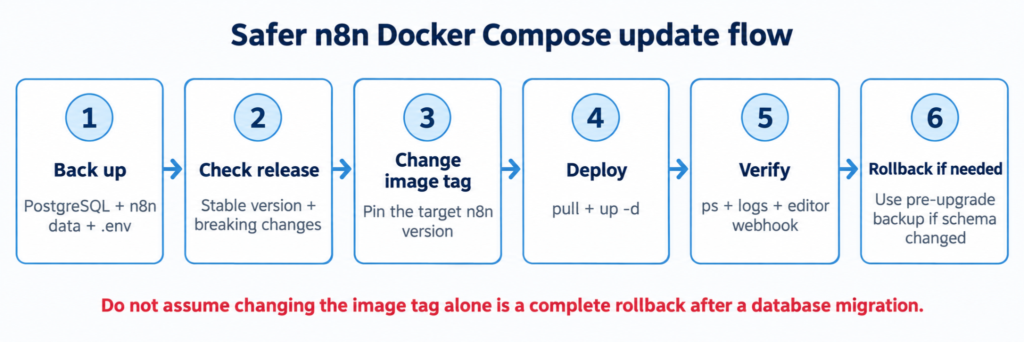
Do not use an unreviewed “pull latest and hope” update on a production instance. Use a repeatable sequence instead:
1. Create a fresh PostgreSQL and n8n-data backup.
2. Check the target n8n stable release and read the relevant release notes or breaking-change guidance.
3. Change N8N_VERSION in .env to the exact version you intend to deploy.
4. Pull the target image and recreate the n8n service.
5. Check container status and n8n logs.
6. Open the editor and run a real webhook or workflow check.
7. Keep the pre-upgrade database backup until the new version is proven stable for your workflows.
docker compose pull n8n
docker compose up -d
docker compose ps
docker compose logs –tail=100 n8n
Rollback warning: changing N8N_VERSION back to the old image may not be a complete rollback. An upgrade can change the database schema. Keep the pre-upgrade database backup so you can restore the matching data state.
How Do You Check n8n Logs and Troubleshoot Problems?
| Problem | First checks |
|---|---|
| n8n container does not start | docker compose ps; n8n logs; .env values; database health |
| Database connection fails | PostgreSQL health; DB_* values; container network; database logs |
| HTTPS does not load | DNS; Nginx config; certificate; ports 80/443; firewall |
| Webhook shows localhost or wrong URL | N8N_WEBHOOK_URL; N8N_PROXY_HOPS; X-Forwarded-* headers |
| Disk usage keeps growing | Docker logs; execution data; database size; available VPS disk |
docker compose ps
docker compose logs --tail=200 n8n
docker compose logs --tail=200 postgres
docker info --format '{{.LoggingDriver}}'
df -h
Docker’s default json-file logging driver does not rotate logs by default. This guide uses the local driver for the n8n service. Docker recommends it for efficient local log storage with rotation. If you keep json-file instead, configure rotation.
n8n also provides a security audit. It can flag outdated instances, risky nodes, unprotected webhooks, and missing security settings. Run it as another check after deployment.
When Should You Consider n8n Queue Mode?
Do not add queue mode just because other self-hosting guides use it. Queue mode is a scaling architecture for workloads that need separate workers. It also adds Redis and worker processes. That means more operational complexity.
If you later move to queue mode, keep PostgreSQL as the shared database. Make Redis available to the main instance and workers. Keep the encryption key consistent across n8n processes. Follow the current n8n scaling documentation instead of extending this single-VPS example by guesswork.
Is Self-Hosting n8n on a VPS Right for You?
A Docker Compose VPS is a good fit when you want deployment control. You should also be comfortable maintaining Linux, Docker, backups, TLS, and monitoring. Self-hosting is not automatically cheaper, safer, or more reliable than n8n Cloud. Those outcomes depend on your infrastructure and operations.
Choose a self-hosted VPS when you need control over hosting, networking, deployment, or data location. You should also be able to operate the server and accept the maintenance work.
Consider n8n Cloud when you want n8n to manage the hosting layer. It is also a better fit if you do not want to own server patching, reverse proxy setup, backups, and recovery.
For GravityWP users, the practical requirement is a stable HTTPS n8n URL that the n8n Connector can reach. See the n8n Connector connection setup once your instance is reachable.
n8n Docker VPS FAQ
Can I run n8n on a small VPS?
Yes, for some workloads. There is no universal VPS size. CPU, memory, execution volume, database growth, and workflow behavior all affect capacity. Monitor the instance and resize when needed.
Do I need Docker Compose to self-host n8n?
No. n8n supports other installation and deployment methods. Docker Compose is useful on a single Linux VPS. It keeps the n8n and database services in one declarative setup.
Why use PostgreSQL instead of SQLite?
SQLite is the default in many simple n8n installations. This guide uses PostgreSQL for a maintained VPS stack. PostgreSQL also fits later scaling patterns. Keep the database version supported and back it up separately.
Should port 5678 be open to the Internet?
Not for the architecture in this guide. n8n is bound to 127.0.0.1:5678 and Nginx exposes the public HTTPS service on ports 80/443.
What replaced WEBHOOK_URL in n8n?
For reverse-proxy setups, n8n now documents N8N_WEBHOOK_URL. The older WEBHOOK_URL variable is deprecated from n8n 2.35.0. For a single proxy, set N8N_PROXY_HOPS=1. Also forward the documented X-Forwarded-* headers.
Final Thoughts
A reliable n8n Docker VPS setup depends on the whole operating model, not one command. Use a supported Docker installation and pin application versions. Keep data persistent, protect the public endpoint with HTTPS, control port exposure, and maintain backups and logs. Use a safe update process.
If you want that control and can maintain the server, Docker Compose is a practical way to self-host n8n. If you do not want to own the infrastructure work, use a managed option instead. In either case, check the current n8n and Docker documentation before you use version-sensitive commands in production.
Our Premium add-ons for Gravity Forms

n8n Connector
Connect Gravity Forms to n8n and automate your workflows with secure, flexible, and powerful webhooks. Go beyond simple notifications and build advanced, two-way automations.

All Entries
All your new Gravity Forms entries in one central place. Stop navigating between multiple forms to find new entries. Get immediate oversight and full control with a powerful, unified dashboard.

List Datepicker
Add a Datepicker with calendar select to a column or multiple columns in a Gravity Forms List Field.
List Text
Add features like textarea, placeholder and custom validation to a column or multiple columns in a Gravity Forms List Field.
Read tutorials about

How to Validate Repeatable Contact Rows in Gravity Forms
Learn how to validate repeatable Gravity Forms List field rows with GravityWP List Text. This tutorial shows how to add email and regex validation, test invalid values, and confirm that valid team roster data is stored correctly.

Gravity Forms Airtable Integration: Create Records From Form Submissions
Learn how to build a Gravity Forms Airtable integration with GravityWP API Connector. Send form submissions to Airtable, create new records automatically, and save the returned Airtable Record ID and response back to Gravity Forms.

Gravity Forms Asana Integration: Create Tasks From Form Submissions
Learn how to connect Gravity Forms to Asana with GravityWP API Connector. This tested workflow creates Asana tasks from form submissions and saves the returned task ID and URL back to Gravity Forms.

Gravity Forms Google Calendar Integration: Create Events From Form Submissions
Connect Gravity Forms to Google Calendar with GravityWP API Connector. Learn how to create calendar events from form submissions, map event details, configure OAuth 2.0, handle time zones, and save the returned Event ID and URL.