Gravity Forms Address Autocomplete simplifies the form filling process helping your users to enter their address with the Google Places suggest API. You make them save time by finding accurate addresses with suggestions and filling forms faster with autofill.
Demo Address Autocomplete
Adds extra options to the Gravity Forms Address field
The plugin adds some extra options to the default GF Address field:
- Enable Google Address Autocomplete
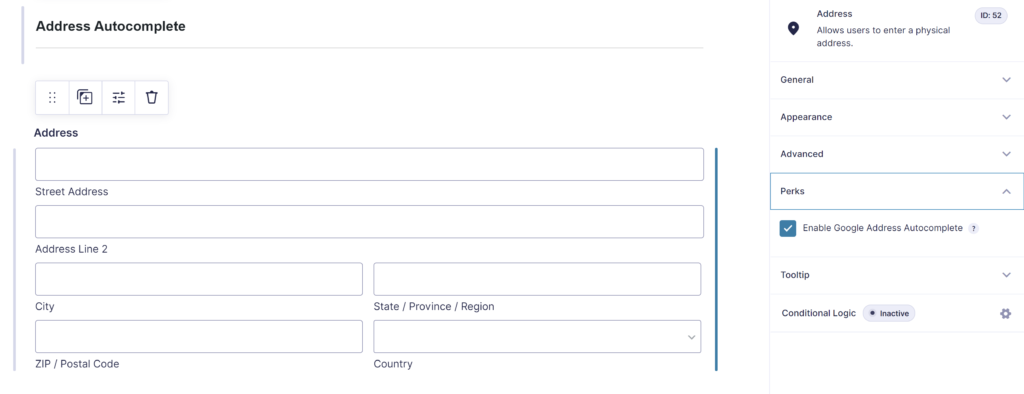
Google Places API
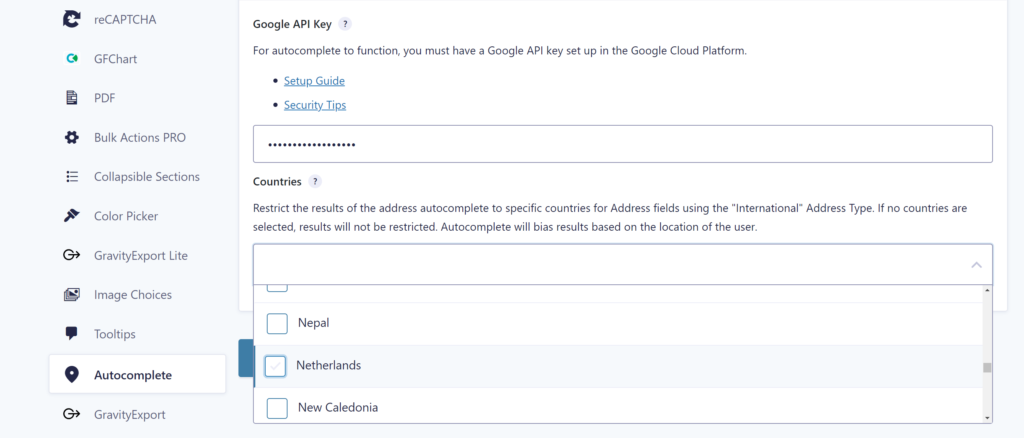
It uses Google Places API to suggest addresses to your users while they type. The admin has the option to use them exclusively on selected address fields. You can use it on as many fields as required. You can define which countries should be available for your site address fields.
Want to fill address fields from another source, such as a postcode lookup or your own CRM? Our Gravity Forms API Connector sends what the visitor types to any external API and fills the Address field with the response, live while they type.
Our Premium add-ons for Gravity Forms

JWT Prefill
Fill forms with data you can trust. Prefill Gravity Forms fields with a secure token instead of links with editable url parameters, so your data is accurate, tamper-proof, and ready to use.
List Text
Add features like textarea, placeholder and custom validation to a column or multiple columns in a Gravity Forms List Field.

Advanced Number Field
Functionality for Number Fields, like rounding or only absolute numbers, fixed point notation, range calculation, custom units like % or m2 & show as slider.

DateTime Field
The GravityWP - DateTime Field add-on adds a dedicated Date/Time field to Gravity Forms so users can enter both a date and a time in a single input.
Read tutorials about

How to Validate Repeatable Contact Rows in Gravity Forms
Learn how to validate repeatable Gravity Forms List field rows with GravityWP List Text. This tutorial shows how to add email and regex validation, test invalid values, and confirm that valid team roster data is stored correctly.

Gravity Forms Airtable Integration: Create Records From Form Submissions
Learn how to build a Gravity Forms Airtable integration with GravityWP API Connector. Send form submissions to Airtable, create new records automatically, and save the returned Airtable Record ID and response back to Gravity Forms.

Gravity Forms Asana Integration: Create Tasks From Form Submissions
Learn how to connect Gravity Forms to Asana with GravityWP API Connector. This tested workflow creates Asana tasks from form submissions and saves the returned task ID and URL back to Gravity Forms.

Gravity Forms Google Calendar Integration: Create Events From Form Submissions
Connect Gravity Forms to Google Calendar with GravityWP API Connector. Learn how to create calendar events from form submissions, map event details, configure OAuth 2.0, handle time zones, and save the returned Event ID and URL.