Do you want to limit the availability of a Checkbox or Radio Button choice based on a maximum number the choice can be selected? For example if you have a maximum number of workshop places or products available? With the Limit Choices Add-on from Gravity Perks you can easily configure that.
How to set maximum limit per choice
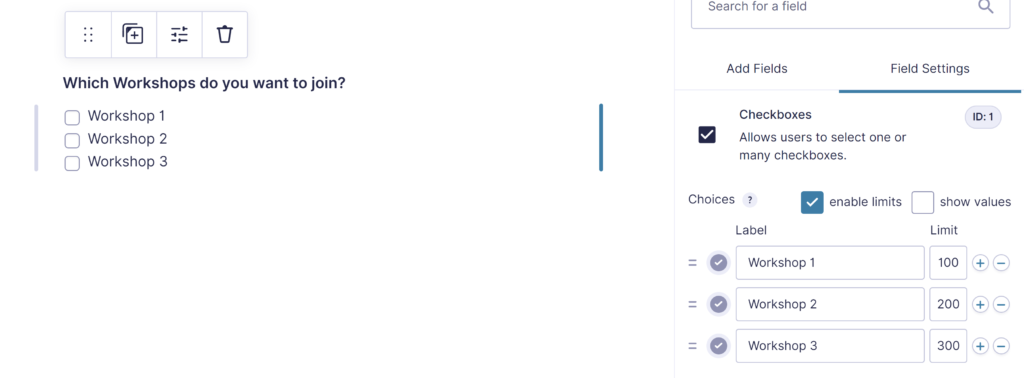
Once you’ve installed and activated the Perk, you’ll have an extra configuration option available with Checkbox, Radio Button, Dropdowns and Multi Select Fields in Gravity Forms. Click ‘enable limits’ to activate it. See the example used in the demo, where we’ve set a limit of 100 to Workshop 1, a limit of 200 to Workshop 2 and a limit of 300 to Workshop 3:
How to display the spots that are left
GravityWiz provided a handy snippet you can easily add to your functions.php file in your WordPress (child)theme to show the number of spots left.
If you want to to change spots in something else, you can easily change the $message variable in the snippet:
$message = sprintf( _n( '(%s product available)', '(%s products available)', $count, 'gp-limit-choices' ), number_format_i18n( $how_many_left ) );Above example will show ‘100 products available’ in stead of ‘100 spots left’. The %s automatically changes in the actual amount remaining, don’t change that.
Conditional Logic for remaining choices
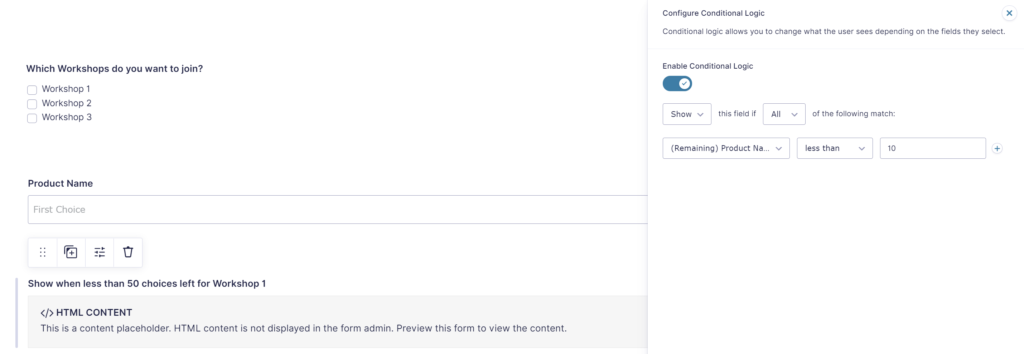
How many choices are left for a specific choice can also be used to configure Conditional Logic, for example for showing a certain HTML Block if there are less then a certain amount of spots left.
How to reset the limits every day
If you want to renew the Limit Choices on a daily basis, you can use this snippet from Gravity Wiz. Don’t forget to change the form_id and the field_ids array to match the Gravity Form and Field you want to renew daily.
Our Premium add-ons for Gravity Forms

JWT Prefill
Fill forms with data you can trust. Prefill Gravity Forms fields with a secure token instead of links with editable url parameters, so your data is accurate, tamper-proof, and ready to use.

All Entries
All your new Gravity Forms entries in one central place. Stop navigating between multiple forms to find new entries. Get immediate oversight and full control with a powerful, unified dashboard.

Advanced Number Field
Functionality for Number Fields, like rounding or only absolute numbers, fixed point notation, range calculation, custom units like % or m2 & show as slider.
List Text
Add features like textarea, placeholder and custom validation to a column or multiple columns in a Gravity Forms List Field.
Read tutorials about

How to Validate Repeatable Contact Rows in Gravity Forms
Learn how to validate repeatable Gravity Forms List field rows with GravityWP List Text. This tutorial shows how to add email and regex validation, test invalid values, and confirm that valid team roster data is stored correctly.

Gravity Forms Airtable Integration: Create Records From Form Submissions
Learn how to build a Gravity Forms Airtable integration with GravityWP API Connector. Send form submissions to Airtable, create new records automatically, and save the returned Airtable Record ID and response back to Gravity Forms.

Gravity Forms Asana Integration: Create Tasks From Form Submissions
Learn how to connect Gravity Forms to Asana with GravityWP API Connector. This tested workflow creates Asana tasks from form submissions and saves the returned task ID and URL back to Gravity Forms.

Gravity Forms Google Calendar Integration: Create Events From Form Submissions
Connect Gravity Forms to Google Calendar with GravityWP API Connector. Learn how to create calendar events from form submissions, map event details, configure OAuth 2.0, handle time zones, and save the returned Event ID and URL.

