Do you want to have a list of all the Merge Tags from a specific form? With this simple Add-on for Gravity Forms you have a special admin page or can use a shortcode to get all the merge tags from a specific Form. No more clicking on a dropdown to select the merge tag you need, but just copy and paste it from the list.
The default (standard) Merge Tag selector in Gravity Forms
This is how the standard Merge Tag selector looks like in Gravity Forms. It’s available in your notifications and your confirmation screen.

Show all Merge Tags quickly
Imagine, you have a Gravity Form. And you want to have an easy way to show all the Merge Tags from that specific form, without having to click on it inside the default option in the confirmations or notifications area: dropdown list with Merge Tags? It also provides a tab with Advanced Merge Tags (label, merge tag, short merge tag, field type(like text, radio, hidden, checkbox, select, etc))

Available Merge Tags & Modifiers
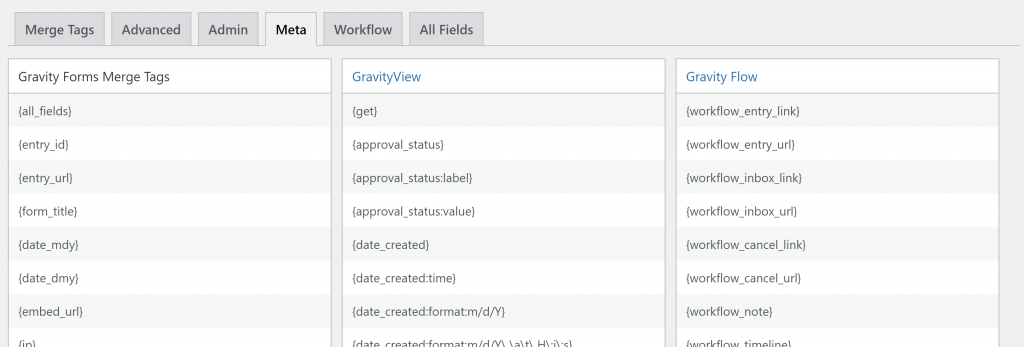
Workflow Step information

Custom Table with All Fields
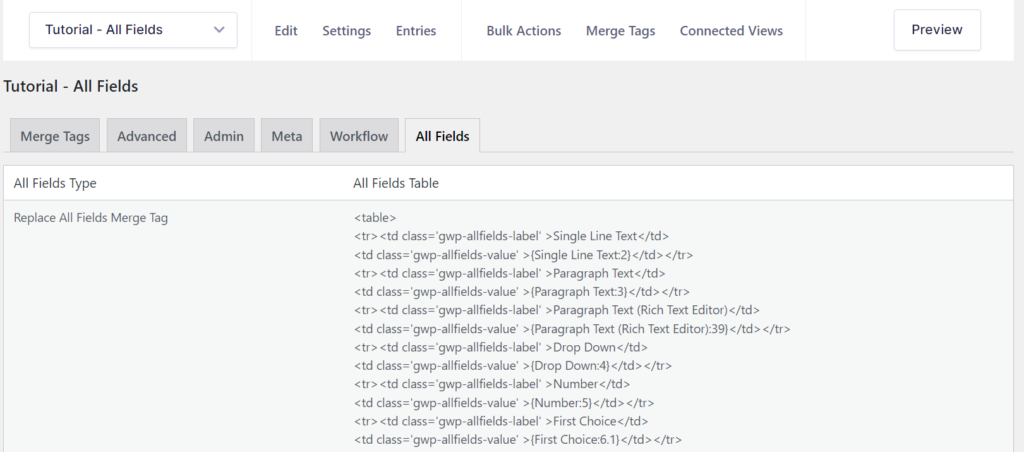
Merge Tags for Gravity PDF
If you make custom pdf templates for Gravity PDF, it can be handy to have a list of all the merge tags from a specific form. With our simple Merge Tags plugin you can use a shortcode to get all the merge tags from a specific form ID.
Our Premium add-ons for Gravity Forms

List Dropdown
Add a Dropdown Select with choices to a column or multiple columns in a Gravity Forms List Field.

Advanced Number Field
Functionality for Number Fields, like rounding or only absolute numbers, fixed point notation, range calculation, custom units like % or m2 & show as slider.

API Connector
Connect Gravity Forms to External API's: Query the API using form field values and automatically fill other form fields with the API response.

Update Multiple Entries
Trigger the update of multiple entries in a target form by submitting an entry in a trigger form.
Read tutorials about

Gravity Forms Airtable Integration: Create Records From Form Submissions
Learn how to build a Gravity Forms Airtable integration with GravityWP API Connector. Send form submissions to Airtable, create new records automatically, and save the returned Airtable Record ID and response back to Gravity Forms.

Gravity Forms Asana Integration: Create Tasks From Form Submissions
Learn how to connect Gravity Forms to Asana with GravityWP API Connector. This tested workflow creates Asana tasks from form submissions and saves the returned task ID and URL back to Gravity Forms.

Gravity Forms Google Calendar Integration: Create Events From Form Submissions
Connect Gravity Forms to Google Calendar with GravityWP API Connector. Learn how to create calendar events from form submissions, map event details, configure OAuth 2.0, handle time zones, and save the returned Event ID and URL.

Gravity Forms Notion Integration: Create Database Pages Without Zapier
Connect Gravity Forms to Notion without Zapier. This tested tutorial shows how to create Notion database pages from form submissions and save the returned page ID, URL, creation time, and API response.
