Building a long Gravity Forms form often means using the same group of fields more than once. For example, you may need to repeat a section for additional attendees, extra contact details, multiple products, or several team members.
Gravity Forms includes field duplication inside the form editor, but duplicating one field at a time can become slow when you need to copy a full section with several fields. This is where a bulk editing tool can save time.
In this tutorial, we’ll show you how to duplicate sections and multiple fields in Gravity Forms using the Bulk Actions for Gravity Forms plugin by JetSloth. This approach is useful when you want to copy a group of fields inside the same form without rebuilding each field manually.
Why duplicate sections and fields in Gravity Forms?
Duplicating fields is helpful when your form has repeated groups of inputs. Instead of creating every field from scratch, you can build one section first, check that it works, then duplicate the fields you need.
This can be useful for forms such as:
- Event registration forms with multiple attendee sections
- Quote request forms with repeated product or service details
- Application forms with repeated education or work history sections
- Order forms where users may need to provide similar information more than once
- Internal forms with repeated admin-only fields
The main benefit is consistency. When you duplicate an existing group of fields, the new fields usually start with the same structure, labels, descriptions, CSS classes, and settings. You can then adjust the copied fields instead of recreating everything manually.
Default duplication vs. bulk duplication
Before using a plugin, it helps to understand the difference between duplicating a single field and duplicating a full group of fields.
| Method | Best for | Main advantage | Main limitation |
|---|---|---|---|
| Gravity Forms default field duplication | Copying one field at a time | No extra plugin needed | Slow for repeated sections or large forms |
| Bulk Actions for Gravity Forms | Copying several fields together | Faster when working with groups of fields | Requires a third-party plugin |
| Developer methods | Custom form editor behavior or command-line workflows | More control for technical users | Not ideal for non-developers |
For most site owners, the bulk duplication method is easier when the goal is simple: select several fields, duplicate them, and place the copied fields where they belong.
How Bulk Actions helps with repeated form sections
Bulk Actions for Gravity Forms adds multi-select tools to the Gravity Forms editor. Instead of editing or moving fields one by one, you can select several fields and apply an action to all selected fields.
For this tutorial, the most important feature is bulk duplication. You can select the fields that belong to a section, duplicate them, and choose where the copied fields should appear in the form.
This is especially helpful when a section contains more than one field. For example, a “Second Attendee” section may need a name field, email field, phone field, meal preference field, and notes field. With bulk duplication, you can copy that whole group much faster than rebuilding each field.
Step 1: Open your Gravity Forms form
Go to your WordPress dashboard and open the Gravity Forms form you want to edit.
Before duplicating anything, review the section you plan to copy. Make sure the original fields are already set up correctly. Check the field labels, descriptions, required settings, choices, CSS classes, and conditional logic.
This matters because any mistake in the original group can carry over to the duplicated fields. It is better to fix the first version before making copies.
Step 2: Select the section and fields you want to duplicate
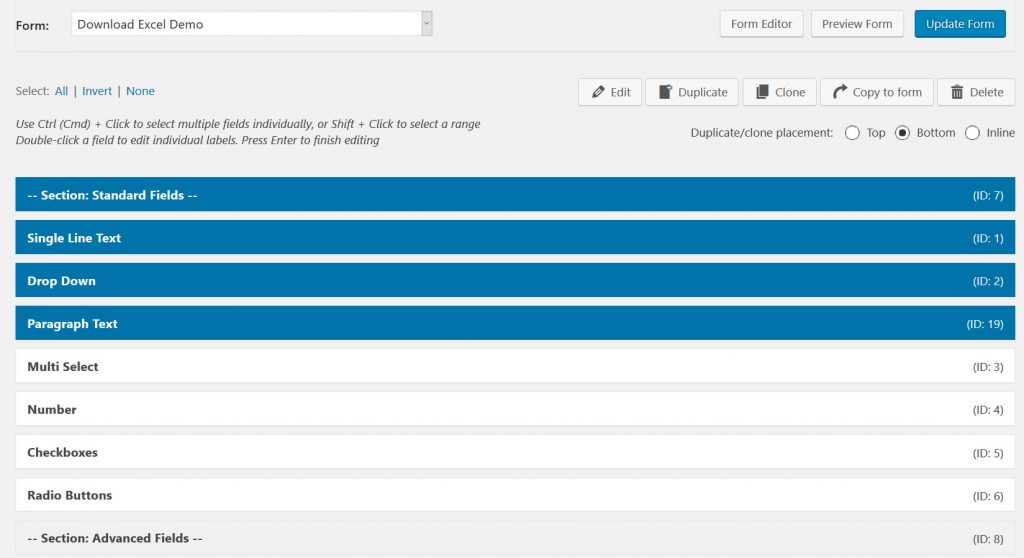
With Bulk Actions active, select the fields you want to copy.
You can use Ctrl + click on Windows or Command + click on Mac to select individual fields. If the fields are placed next to each other, you can use Shift + click to select a range.
For a full section, select the Section field and the fields that belong under it. This helps keep the copied group together and makes the form easier to organize after duplication.
Step 3: Choose where the duplicated fields should appear
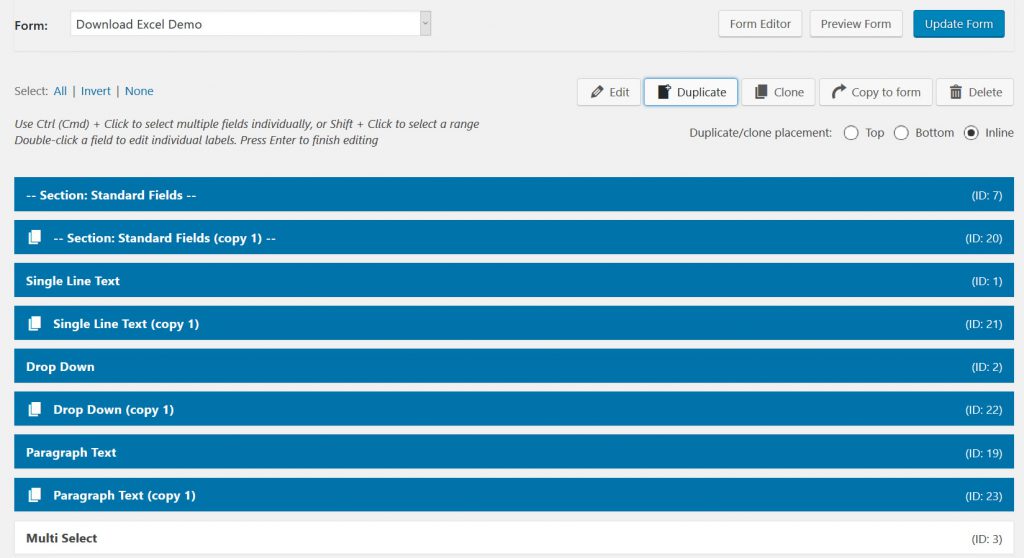
After selecting the fields, choose the duplicate action and decide where the copied fields should be placed.
Depending on your setup, you may be able to place the duplicated fields at the top, bottom, or inline near the original fields. For repeated sections, inline placement is often the easiest option because the copied fields appear close to the fields you just duplicated.
After the fields are copied, move or rename them as needed.
For example, if the original section is called “Attendee 1,” you may want to rename the copied section to “Attendee 2.” You should also update the labels of the copied fields so users understand which section they are filling out.
Step 4: Review the copied fields
After duplication, go through the copied section carefully.
Check these items before saving your final version:
| Item to check | Why it matters |
|---|---|
| Field labels | Users need to know which copied section they are completing |
| Admin labels | Admin labels help keep entries easier to read in the dashboard |
| Conditional logic | Copied logic may still refer to fields from the original section |
| Calculations | Formula fields may need updated field references |
| Notifications | Email messages may need the new fields added |
| Confirmations | Confirmation text may need to show the copied field values |
| CSS classes | Layout classes may need small adjustments after duplication |
This review step is important. Bulk duplication speeds up form building, but you still need to make sure the copied fields work correctly in their new context.
When manual duplication is enough
You may not need a bulk tool for every form.
If you only need to duplicate one or two fields, the default Gravity Forms editor may be enough. This keeps your setup simple and avoids adding another plugin for a small task.
Manual duplication works best when:
- You are copying only one field
- The form is short
- The copied field does not use complex logic
- You only need to make a quick edit once
However, manual duplication becomes less practical when you are building long forms or repeating the same group of fields several times.
Developer options for advanced users
Developers have other ways to work with duplicated fields.
Gravity Forms provides the gform_duplicate_field JavaScript filter, which allows developers to modify a field when it is duplicated in the form editor. This is useful if a developer wants to adjust the duplicated field programmatically.
Gravity Forms also has a WP-CLI add-on that includes a field duplication command for command-line workflows. This is more suitable for developers or site administrators who already use WP-CLI.
For non-developers, Bulk Actions is usually easier because it keeps the work inside the visual form editor.
Best practices after duplicating fields
Duplicating fields can save time, but copied fields should not be treated as finished right away. Always test the form from the front end after making changes.
Submit a test entry and check whether:
- The fields appear in the correct order
- Required fields behave as expected
- Conditional logic shows and hides the right fields
- Calculations return the correct result
- Notifications include the right field values
- The entry details are easy for admins to read
If the form is used on a live site, test it in a staging environment first. This is especially important for payment forms, registration forms, and forms connected to workflows or third-party services.
Final thoughts
Duplicating sections and fields in Gravity Forms is a simple way to build repeated form layouts faster. If you only need to copy one field, the default editor may be enough. But when you are working with larger forms or repeated sections, Bulk Actions can make the process much quicker.
The key is to review the copied fields after duplication. Update the labels, check the logic, test the form, and make sure the final version works clearly for both users and admins.
Frequently asked questions
You can duplicate the Section field and the fields under it if you select them together with a tool like Bulk Actions. After copying them, review the duplicated fields and update labels, logic, and calculations where needed.
Not always. If your copied fields use conditional logic, review the rules after duplication. Some conditions may still point to fields from the original section.
No. Gravity Forms can duplicate individual fields in the form editor. Bulk Actions is helpful when you want to select and duplicate multiple fields at once.
You can, but it is safer to duplicate and test fields in a staging environment first. This helps prevent mistakes on active forms that already receive submissions.
Our Premium add-ons for Gravity Forms

DateTime Field
The GravityWP - DateTime Field add-on adds a dedicated Date/Time field to Gravity Forms so users can enter both a date and a time in a single input.

List Dropdown
Add a Dropdown Select with choices to a column or multiple columns in a Gravity Forms List Field.

n8n Connector
Connect Gravity Forms to n8n and automate your workflows with secure, flexible, and powerful webhooks. Go beyond simple notifications and build advanced, two-way automations.

Advanced Number Field
Functionality for Number Fields, like rounding or only absolute numbers, fixed point notation, range calculation, custom units like % or m2 & show as slider.
Read tutorials about

How to Validate Repeatable Contact Rows in Gravity Forms
Learn how to validate repeatable Gravity Forms List field rows with GravityWP List Text. This tutorial shows how to add email and regex validation, test invalid values, and confirm that valid team roster data is stored correctly.

Gravity Forms Airtable Integration: Create Records From Form Submissions
Learn how to build a Gravity Forms Airtable integration with GravityWP API Connector. Send form submissions to Airtable, create new records automatically, and save the returned Airtable Record ID and response back to Gravity Forms.

Gravity Forms Asana Integration: Create Tasks From Form Submissions
Learn how to connect Gravity Forms to Asana with GravityWP API Connector. This tested workflow creates Asana tasks from form submissions and saves the returned task ID and URL back to Gravity Forms.

Gravity Forms Google Calendar Integration: Create Events From Form Submissions
Connect Gravity Forms to Google Calendar with GravityWP API Connector. Learn how to create calendar events from form submissions, map event details, configure OAuth 2.0, handle time zones, and save the returned Event ID and URL.