Do you need a Number field in your Gravity Forms list column? And to make calculations within a list row or column? No need to look further, our List Number Format Add-on does just that: Turn your list field columns into repeatable number fields.
How to use numbers in Gravity Forms Lists?
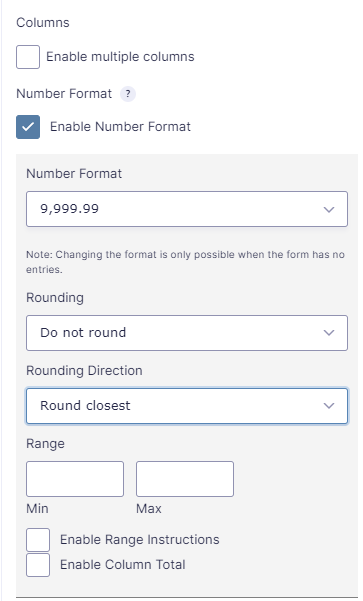
Just install the plugin and make a Gravity Form with a List Field. You will see this extra options:
- Click on the ‘Enable Number Format‘ checkbox
- You have different options:
- Number Format: point decimals, comma decimals and Currency.
- Rounding: Up to 5 numbers after the decimal.
- Rounding Direction: Round closest, Round up, Round down
- Range: Define a minimum and maximum number.
- Enable Range Instructions: When clicked it will show instructions about the minimum and maximum number.
- Enable Column Total: Will add an extra row at the bottom of your list with the column total calculation.
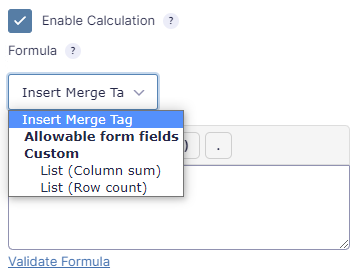
Extra Merge Tags with sum of rows or column
When the List Number Format add-on is activated, you’ll get extra Merge Tags with the List Column sum and Row count (number of rows).
You can select the Merge Tags List (Column sum) and List (Row count) from the dropdown.
- List (Column sum): Calculates the total of all numbers in one or multiple rows together.
- List (Row count): Counts the number of rows.
You can also use these Merge Tags on other places, like in the notification, GravityView or Workflows.
Our Premium add-ons for Gravity Forms

API Connector
Connect Gravity Forms to External API's: Query the API using form field values and automatically fill other form fields with the API response.
List Datepicker
Add a Datepicker with calendar select to a column or multiple columns in a Gravity Forms List Field.

Advanced Merge Tags
This Gravity Forms Add-On adds extra Merge Tag modifiers (and a lot of power). From the most common used functions like capitalize and length to changing date formats.

JWT Prefill
Fill forms with data you can trust. Prefill Gravity Forms fields with a secure token instead of links with editable url parameters, so your data is accurate, tamper-proof, and ready to use.
Read tutorials about

How to Validate Repeatable Contact Rows in Gravity Forms
Learn how to validate repeatable Gravity Forms List field rows with GravityWP List Text. This tutorial shows how to add email and regex validation, test invalid values, and confirm that valid team roster data is stored correctly.

Gravity Forms Airtable Integration: Create Records From Form Submissions
Learn how to build a Gravity Forms Airtable integration with GravityWP API Connector. Send form submissions to Airtable, create new records automatically, and save the returned Airtable Record ID and response back to Gravity Forms.

Gravity Forms Asana Integration: Create Tasks From Form Submissions
Learn how to connect Gravity Forms to Asana with GravityWP API Connector. This tested workflow creates Asana tasks from form submissions and saves the returned task ID and URL back to Gravity Forms.

Gravity Forms Google Calendar Integration: Create Events From Form Submissions
Connect Gravity Forms to Google Calendar with GravityWP API Connector. Learn how to create calendar events from form submissions, map event details, configure OAuth 2.0, handle time zones, and save the returned Event ID and URL.
