Did you know you can use images in your radio buttons in Gravity Forms? This is a nice way to provide your visitors with a visual, appropriate image to select when they provide information. You see it already as a design pattern, so use it also in your Gravity Form!
Configuration of Radio Button Images in Gravity Forms
You just add an <img> tag in the label, containing the image you want to show.
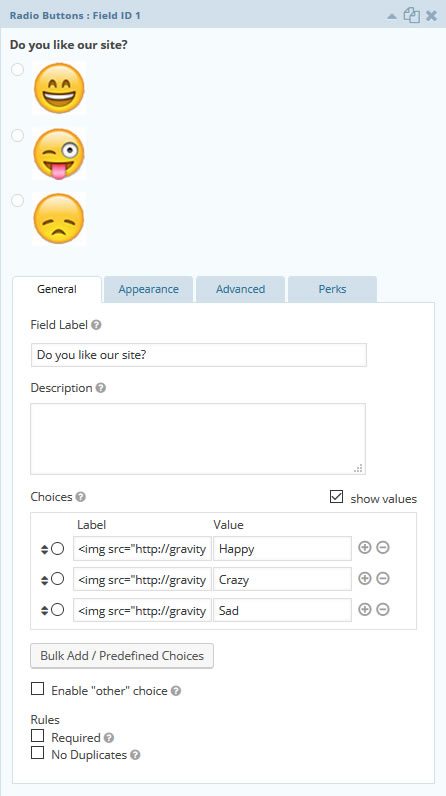
HTML code used in this example
In this example we used the following code to show images in our Gravity Forms Radio button field:
<img src="http://gravitywp.com/gravity/uploads/2015/10/smiley-1.jpg" alt="Happy"></img>
<img src="http://gravitywp.com/gravity/uploads/2015/10/smiley-2.jpg" alt="Crazy"></img>
<img src="http://gravitywp.com/gravity/uploads/2015/10/smiley-3.jpg" alt="Not happy"></img>
Image Choices Plugin (JetSloth)
JetSloth made a Gravity Forms add-on to make adding images to radio-buttons (and checkboxes) even more simple. Read more about the Image Choices plugin for Gravity Forms.
Our Premium add-ons for Gravity Forms

All Entries
All your new Gravity Forms entries in one central place. Stop navigating between multiple forms to find new entries. Get immediate oversight and full control with a powerful, unified dashboard.
List Text
Add features like textarea, placeholder and custom validation to a column or multiple columns in a Gravity Forms List Field.

List Number Format
With this Gravity Forms Add-on you can change List Field columns into a number field, do calculations within a row or column. Extra merge tags are available with total counts of columns.

Field to Entries
Create entries based on Checkboxes & Multi Select choices & List Field rows.
Read tutorials about

How to Create Gravity Forms Entriesfrom Comma-Separated Text
Turn a comma-separated task list into separate Gravity Forms entries. Follow our tested Field to Entries setup, mapping, and custom separator example.

How to Validate Repeatable Contact Rows in Gravity Forms
Learn how to validate repeatable Gravity Forms List field rows with GravityWP List Text. This tutorial shows how to add email and regex validation, test invalid values, and confirm that valid team roster data is stored correctly.

Gravity Forms Airtable Integration: Create Records From Form Submissions
Learn how to build a Gravity Forms Airtable integration with GravityWP API Connector. Send form submissions to Airtable, create new records automatically, and save the returned Airtable Record ID and response back to Gravity Forms.

Gravity Forms Asana Integration: Create Tasks From Form Submissions
Learn how to connect Gravity Forms to Asana with GravityWP API Connector. This tested workflow creates Asana tasks from form submissions and saves the returned task ID and URL back to Gravity Forms.