In Gravity Forms there is the option to count characters. But maybe you want to limit the amount of Words typed in a Single Line Text, Paragraph Text and Post Body fields.
You can do this with the Gravity Perks Plugin Word Count. With this plugin it’s possible to set a minimum number of Words and a maximum number of Words in a text field in Gravity Forms. This way you have much more control over what people type in your form.
How to add Word Count validation
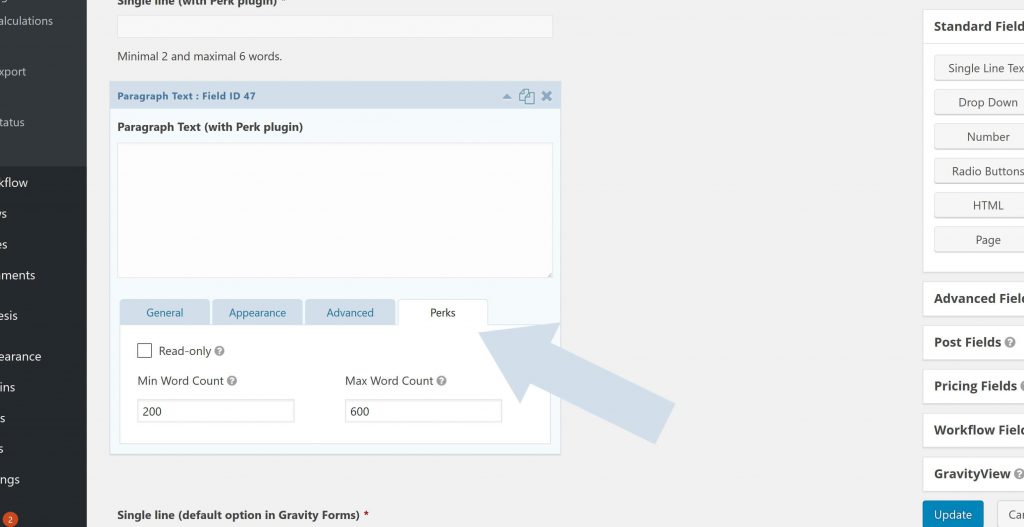
Install the plugin and after it you’ll find an extra ‘tab’ in the Single Line Text and Paragraph Text field (and Post Body Text) of your form. Just fill in the minimal and/or maximum number of words you allow in this specific field, and GravityWiz will do the rest.
Alternative: Using maximum characters
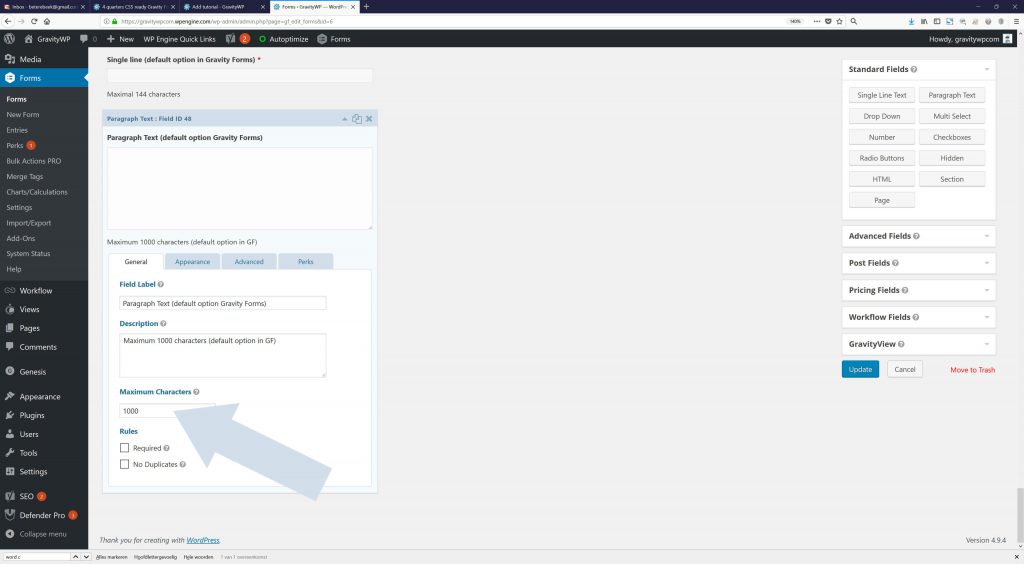
As a default option, Gravity Forms allows you to set a maximum number of characters that can be filled in a Single Line or Paragraph Text field in a form. Just fill in a number and Gravity Forms takes care of the rest.
Word Count Merge Tag Modifier
The gwp_word_count Gravity Forms Merge Tag Modifier counts the number of words in a string value. This can be handy when you want to count the number of Words for calculating translation costs or to show quickly if the number of used words are fitting a specific content template (like an essay).
{Text:1:gwp_word_count}| EXAMPLE VALUE | MODIFIER RESULT |
|---|---|
| GravityWP Advanced Merge Tags | 4 |
| Lorem ipsum dolor sit amet, consectetur adipiscing elit, sed do eiusmod tempor incididunt ut labore et dolore magna aliqua. | 19 |
| Sed ut perspiciatis unde omnis iste natus error sit voluptatem accusantium doloremque laudantium, totam rem aperiam, eaque ipsa quae ab illo inventore veritatis et quasi architecto beatae vitae dicta sunt explicabo. Nemo enim ipsam voluptatem quia voluptas sit aspernatur aut odit aut fugit, sed quia consequuntur magni dolores eos qui ratione voluptatem sequi nesciunt. Neque porro quisquam est, qui dolorem ipsum quia dolor sit amet, consectetur, adipisci velit, sed quia non numquam eius modi tempora incidunt ut labore et dolore magnam aliquam quaerat voluptatem. Ut enim ad minima veniam, quis nostrum exercitationem ullam corporis suscipit laboriosam, nisi ut aliquid ex ea commodi consequatur? Quis autem vel eum iure reprehenderit qui in ea voluptate velit esse quam nihil molestiae consequatur, vel illum qui dolorem eum fugiat quo voluptas nulla pariatur? | 129 |
Our Premium add-ons for Gravity Forms

API Connector
Connect Gravity Forms to External API's: Query the API using form field values and automatically fill other form fields with the API response.

JWT Prefill
Fill forms with data you can trust. Prefill Gravity Forms fields with a secure token instead of links with editable url parameters, so your data is accurate, tamper-proof, and ready to use.

All Entries
All your new Gravity Forms entries in one central place. Stop navigating between multiple forms to find new entries. Get immediate oversight and full control with a powerful, unified dashboard.

n8n Connector
Connect Gravity Forms to n8n and automate your workflows with secure, flexible, and powerful webhooks. Go beyond simple notifications and build advanced, two-way automations.
Read tutorials about

How to Create a Public Submission Business Directory in WordPress (Gravity Forms + GravityView)
Build a moderated business directory where users submit listings through a form, admins approve entries, and approved businesses appear in a searchable GravityView directory.

How to Create an Event Workshop Registration + Waitlist System in WordPress
This guide shows how to set up a workshop registration + waitlist system in WordPress: register attendees until capacity is reached, waitlist the rest, approve entries, and auto-promote people when a seat opens using Gravity Forms, Gravity Flow, and GravityView.

Gravity Flow Form Submission Step Tutorial
The Gravity Flow Form Submission step pauses a workflow until another form is submitted, then continues once the handoff is complete. This guide shows how to connect two forms, prefill fields with mapping, send the correct secure link, and troubleshoot the most common “workflow didn’t move” issues.

Gravity Flow Delete an Entry Step Tutorial
The Gravity Flow Delete Entry step lets you trash or permanently remove Gravity Forms entries as part of a workflow. This guide covers the key settings, scheduling options (delay or date-based), and safe testing tips so you can follow retention and privacy rules with confidence.

