Maybe you want to generate a unique ID, code, number or combination of numbers and letters for each entry in Gravity Forms. This is very easy with the special Gravity Perk Unique ID.
Try it yourself
Types of Unique ID’s for Gravity Forms
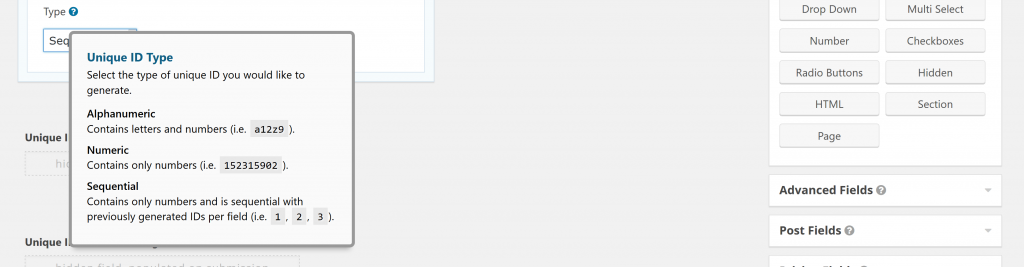
You can create three types of custom and unique codes for your Gravity Forms Entry:
- Alphanumeric Contains letters and numbers (i.e. gravitywp12z9)
- Numeric Contains only numbers (i.e. 20155512)
- Sequential Contains only numbers and is sequential with previously generated IDs per field (i.e. 1, 2, 3)
Add a prefix or a Suffix to your unique id
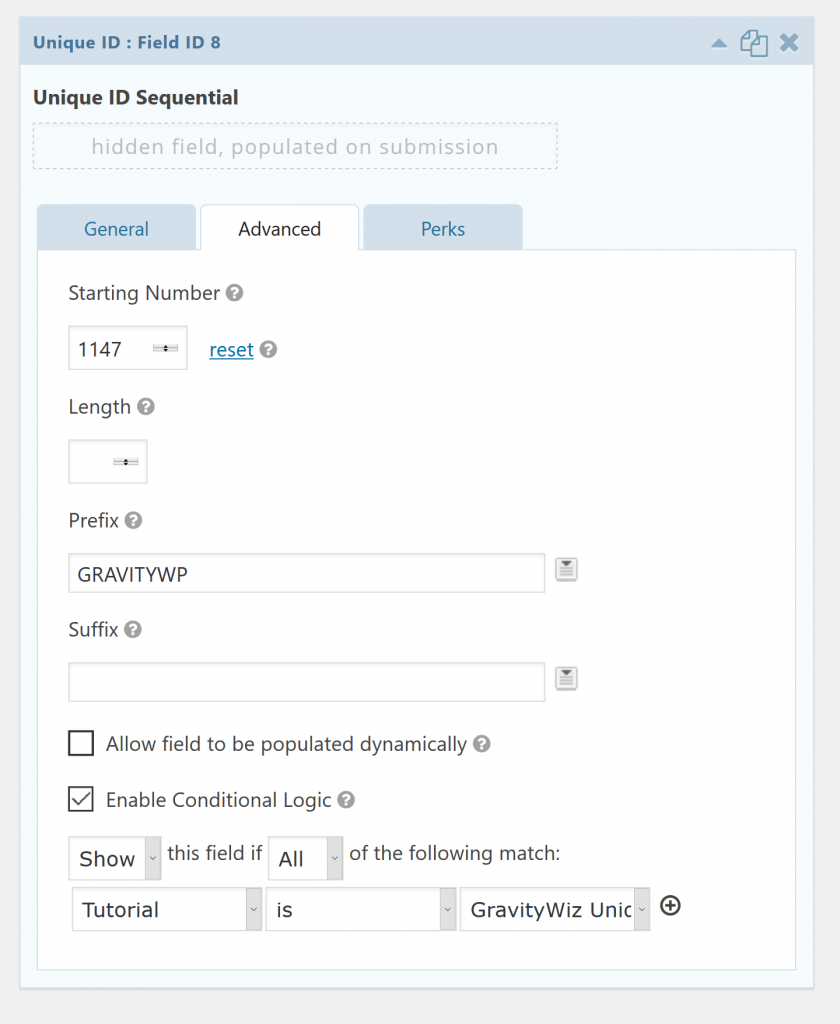
In the advanced tab of your Gravity Forms field you can choose several options for your Unique ID:
- Starting Number (in case it’s a Sequential ID) with an option to reset the numbering
- Lenght: how long should the unique ID be?
- Prefix: what should be ‘before’ every ID?
- Suffic: what should be ‘after’ every ID?
Our Premium add-ons for Gravity Forms

List Text
Add features like textarea, placeholder and custom validation to a column or multiple columns in a Gravity Forms List Field.

All Entries
All your new Gravity Forms entries in one central place. Stop navigating between multiple forms to find new entries. Get immediate oversight and full control with a powerful, unified dashboard.

Entry to Database
Integrates Gravity Forms with internal or external databases, offering flexible mapping of form fields to database columns and real-time synchronization between entries and database rows.

JWT Prefill
Fill forms with data you can trust. Prefill Gravity Forms fields with a secure token instead of links with editable url parameters, so your data is accurate, tamper-proof, and ready to use.
Read tutorials about

How to Create a Public Submission Business Directory in WordPress (Gravity Forms + GravityView)
Build a moderated business directory where users submit listings through a form, admins approve entries, and approved businesses appear in a searchable GravityView directory.

How to Create an Event Workshop Registration + Waitlist System in WordPress
This guide shows how to set up a workshop registration + waitlist system in WordPress: register attendees until capacity is reached, waitlist the rest, approve entries, and auto-promote people when a seat opens using Gravity Forms, Gravity Flow, and GravityView.

Gravity Flow Form Submission Step Tutorial
The Gravity Flow Form Submission step pauses a workflow until another form is submitted, then continues once the handoff is complete. This guide shows how to connect two forms, prefill fields with mapping, send the correct secure link, and troubleshoot the most common “workflow didn’t move” issues.

Gravity Flow Delete an Entry Step Tutorial
The Gravity Flow Delete Entry step lets you trash or permanently remove Gravity Forms entries as part of a workflow. This guide covers the key settings, scheduling options (delay or date-based), and safe testing tips so you can follow retention and privacy rules with confidence.
