Maybe you want to generate a unique ID, code, number or combination of numbers and letters for each entry in Gravity Forms. This is very easy with the special Gravity Perk Unique ID.
Try it yourself
Types of Unique ID’s for Gravity Forms
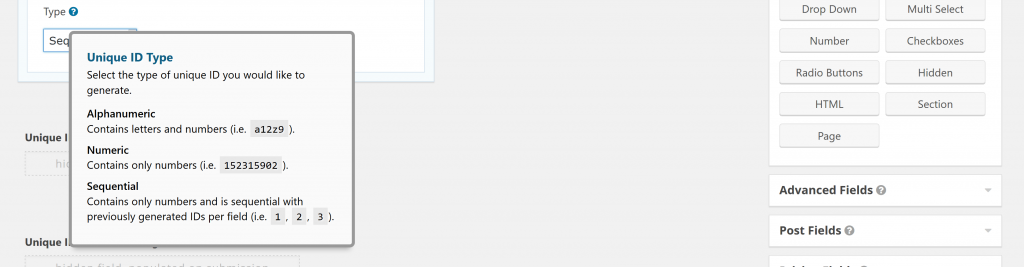
You can create three types of custom and unique codes for your Gravity Forms Entry:
- Alphanumeric Contains letters and numbers (i.e. gravitywp12z9)
- Numeric Contains only numbers (i.e. 20155512)
- Sequential Contains only numbers and is sequential with previously generated IDs per field (i.e. 1, 2, 3)
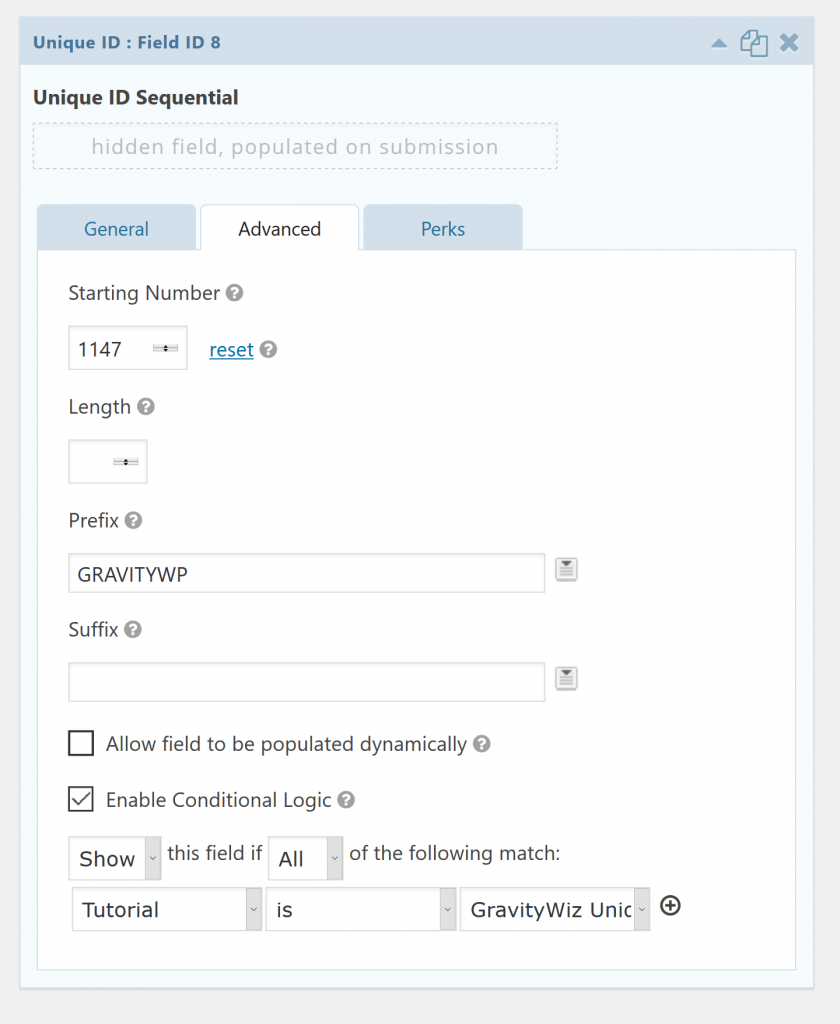
Add a prefix or a Suffix to your unique id
In the advanced tab of your Gravity Forms field you can choose several options for your Unique ID:
- Starting Number (in case it’s a Sequential ID) with an option to reset the numbering
- Lenght: how long should the unique ID be?
- Prefix: what should be ‘before’ every ID?
- Suffic: what should be ‘after’ every ID?
Our Premium add-ons for Gravity Forms

List Number Format
With this Gravity Forms Add-on you can change List Field columns into a number field, do calculations within a row or column. Extra merge tags are available with total counts of columns.

API Connector
Connect Gravity Forms to External API's: Query the API using form field values and automatically fill other form fields with the API response.

Advanced Number Field
Functionality for Number Fields, like rounding or only absolute numbers, fixed point notation, range calculation, custom units like % or m2 & show as slider.
Field to Entries
Create entries based on Checkboxes & Multi Select choices & List Field rows.
Read tutorials about

Gravity Forms Airtable Integration: Create Records From Form Submissions
Learn how to build a Gravity Forms Airtable integration with GravityWP API Connector. Send form submissions to Airtable, create new records automatically, and save the returned Airtable Record ID and response back to Gravity Forms.

Gravity Forms Asana Integration: Create Tasks From Form Submissions
Learn how to connect Gravity Forms to Asana with GravityWP API Connector. This tested workflow creates Asana tasks from form submissions and saves the returned task ID and URL back to Gravity Forms.

Gravity Forms Google Calendar Integration: Create Events From Form Submissions
Connect Gravity Forms to Google Calendar with GravityWP API Connector. Learn how to create calendar events from form submissions, map event details, configure OAuth 2.0, handle time zones, and save the returned Event ID and URL.

Gravity Forms Notion Integration: Create Database Pages Without Zapier
Connect Gravity Forms to Notion without Zapier. This tested tutorial shows how to create Notion database pages from form submissions and save the returned page ID, URL, creation time, and API response.
