If you’ve been automating things for a while, there’s a good chance you started with Zapier and eventually found yourself wondering how n8n vs Zapier really compares.
You connect a few apps, build a Zap in minutes, and suddenly leads land in your CRM, forms sync to a spreadsheet, and Slack pings you when something important happens. It feels like magic until a few things start nagging you:
“Why are we burning through so many tasks?”
“Do we really want all of this data going through someone else’s cloud?”
“This workflow is getting complicated. Is Zapier still the right place for it?”
That’s usually when people start searching for “n8n vs Zapier.”
Both tools solve the same core problem: move data between apps, trigger actions, and increasingly, orchestrate AI. But they come from very different philosophies. Zapier is a fully hosted SaaS that optimizes for ease of use and a huge integrations library. n8n gives you a workflow engine you can run in the cloud or on your own server, with a fair-code license and a more technical mindset.
At GravityWP, we build Gravity Forms add-ons like the GravityWP n8n Connector, so we kept hearing the same question from customers: “Is it worth moving some of our automations from Zapier to n8n?” This article is our vendor-neutral answer: a clear comparison first, and then where n8n (and our connector) starts to make sense if you’re running WordPress and Gravity Forms.
This article walks through the key differences so you can decide which one actually fits your work and when it might be worth moving from Zapier to n8n instead of just upgrading to the next Zapier plan.
Quick Overview: What Are Zapier and n8n?
Zapier in one paragraph
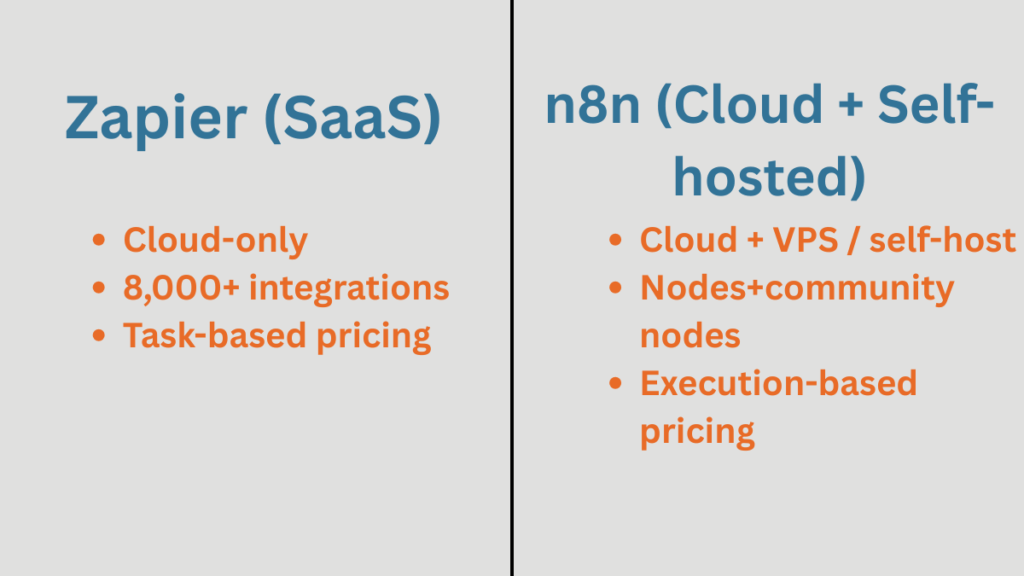
Zapier is a cloud-only automation and AI orchestration platform. You build “Zaps” made of a trigger plus one or more actions. Each time the Zap runs and completes an action, that action counts as a task, which is Zapier’s main billing unit.
The big headline: Zapier connects you to 8,000+ apps, from Google Sheets and Slack to a long tail of niche SaaS tools, and lets non-technical users create automations and AI workflows directly in the browser.
n8n in one paragraph
n8n is a workflow automation platform with native AI capabilities that you can run either on n8n Cloud or on your own infrastructure. Instead of Zaps, you build workflows made of nodes: triggers, actions, and core utilities like IF, Merge, Loop, and Code.
n8n is source-available under a fair-code “Sustainable Use License”, which means you can inspect the source code and self-host a Community Edition, but there are licensing rules for some commercial uses and higher-volume self-hosted scenarios.
Officially, n8n highlights that cloud plans include all integrations, and the wider ecosystem combines official nodes plus a large catalog of community-built nodes on npm (more on that later).
In short:
- Zapier: “Click, connect, and forget the infrastructure.”
- n8n: “Give us a server or cloud account and we’ll give you deep control.”
That high-level contrast is the starting point for any n8n vs Zapier comparison.
Pricing Models in n8n vs Zapier: Tasks vs Executions
Pricing is where n8n vs Zapier starts to feel very different in practice especially once you factor in self-hosting.
How Zapier pricing works
Zapier’s plans are built around tasks per month.
A task is an action your Zap successfully completes – for example, creating a contact in your CRM or sending a Slack message. If a Zap has three actions and it runs once, that’s three tasks.
From Zapier’s own pricing pages and help docs, a few key points stay consistent over time:
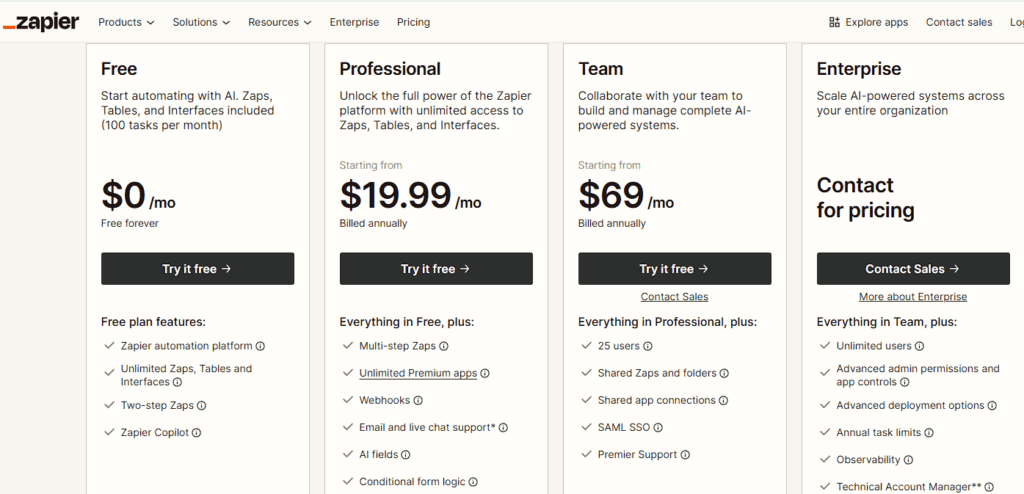
- The Free plan includes 100 tasks per month and is limited to simple, two-step Zaps.
- Paid plans give you:
- More tasks per month.
- Faster polling for many triggers.
- Features like multi-step Zaps, paths/branching, webhooks, and better support.
- The Professional plan for individuals and small teams currently starts at $19.99/month billed annually, and Team plans start at $69/month billed annually, with higher prices as you move up task tiers.
- If you go over your monthly task limit, Zapier can automatically switch you to pay-per-task billing so automations keep running.
This model is perfect if:
- Your automations are simple.
- You don’t run them very often.
- You’re happy to trade some cost predictability for a polished SaaS experience.
Where it starts to hurt is when you:
- Have workflows that fire all day.
- Use many actions and branches in one Zap.
- Process lots of records (for example: bulk updates in spreadsheets or CRMs).
Every extra action is another task on your bill. A Zap that runs 10,000 times per month and performs 5 actions per run already consumes 50,000 tasks, which tends to push you into higher Zapier task tiers.
How n8n pricing works
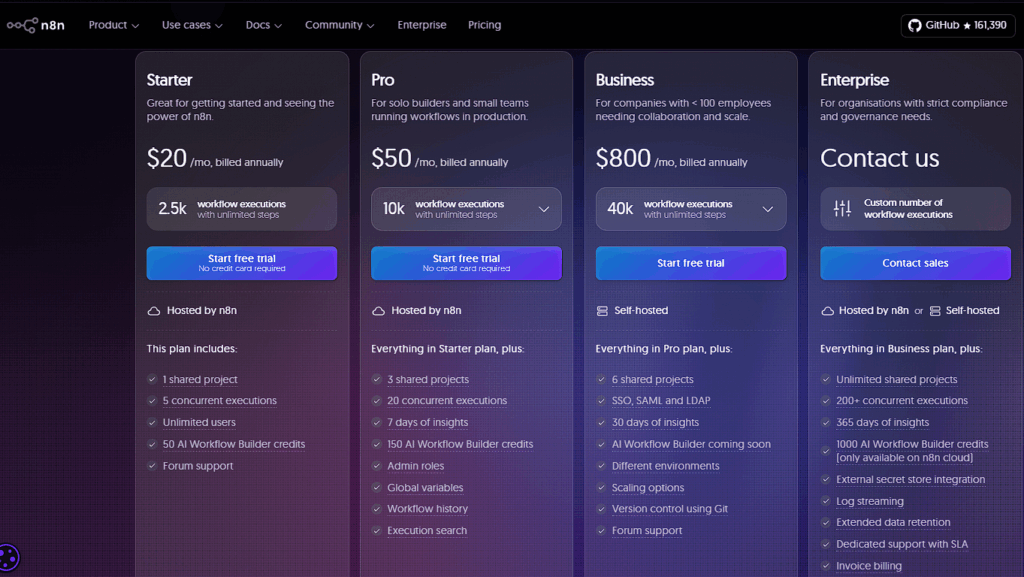
n8n takes a different route. Its cloud pricing is based on workflow executions per month, not the number of steps inside each workflow.
From n8n’s pricing page:
- The Starter cloud plan starts at about $20/month (billed annually) for 2,500 workflow executions with unlimited steps.
- The Pro plan starts around $50/month for 10,000 executions.
- Higher-volume Business and Enterprise plans cover tens of thousands of executions and more advanced features.
- All cloud plans include unlimited users, workflows, and steps, and access to every official integration. Limits mainly apply to executions and retention.
On top of that, there’s a self-hosted Community Edition under the Sustainable Use License:
- You don’t pay n8n per task or execution there; instead you pay for your own infrastructure (for example, a VPS or Kubernetes cluster) and your time to manage it.
So, structurally:
- Zapier: task-based SaaS billing.
- n8n Cloud: execution-based SaaS billing.
- Self-hosted n8n: infrastructure + your time, no per-task billing for the Community Edition (but check the license if you embed n8n in a commercial product).
Where self-hosted n8n can be dramatically cheaper
The big cost story in n8n vs Zapier is what happens when you self-host n8n instead of paying per task or per execution.
A small VPS that can comfortably run a Community Edition n8n instance is not expensive:
- Providers like Contabo and DigitalOcean advertise entry-level servers in roughly the $4–$6/month range, depending on region and specs.
If you install n8n Community Edition on a server like that:
- Your infrastructure cost is basically a fixed monthly fee, as long as the server can handle your workflows.
- You’re not paying more because you added a few extra branches, loops, or error-handling nodes.
- You’re not billed per task like Zapier, or per execution like n8n Cloud.
That’s why many “Zapier alternative” comparisons highlight n8n’s self-hosted model: once you reach tens of thousands of tasks per month, paying Zapier or n8n Cloud to count every task/execution can easily cost several times more than running one well-tuned n8n instance on a modest VPS.
You’re trading:
- Money → lower recurring SaaS bills, especially at higher volume.
- Time and responsibility → you now manage updates, backups, and monitoring for that server.
If you’re just testing ideas or running a couple of small Zaps, Zapier’s pricing is still simpler. But if you’re building a long-term automation layer for your business, self-hosted n8n is where the biggest cost wins tend to show up.
A simple pricing comparison example
Imagine you have a workflow that:
- Triggers 10,000 times per month.
- For each run, it:
- Creates a contact in your CRM.
- Sends a Slack notification.
- Adds a row to a reporting sheet.
- Creates a contact in your CRM.
In Zapier terms, that’s 3 actions per run → 30,000 tasks per month. Your plan choice and cost scale with those 30,000 tasks.
In n8n Cloud, that same logic can live in a single workflow. Each run is 1 execution, no matter how many nodes you chain together. So you’d be looking at 10,000 executions per month instead of 30,000 task units.
You still pay based on volume, but n8n is much less sensitive to how many internal steps or branches you add to a workflow. This is one of the reasons teams with complex workflows and lots of branching start to look at n8n more seriously over time.
To stay realistic: n8n’s self-hosted Business and Enterprise licenses for heavy use also have execution limits and fees it’s not “free forever” at any scale but you do have more flexibility in how you pay and where you run it.
Hosting & Data Control in n8n vs Zapier (SaaS vs Self-Hosted)
Zapier: fully managed SaaS
Hosting and data control is another big axis in the n8n vs Zapier decision. Zapier is straightforward here: it’s a hosted service only. There is no official self-hosted or on-prem edition. All Zaps execute on Zapier’s infrastructure, and data flows through Zapier whenever a workflow runs.
On the security and compliance side, Zapier documents encryption in transit and at rest, SOC2/SOC3 reports, and GDPR-related measures. For many teams, that’s a clear benefit: you don’t have to think about patching, uptime, scaling, or backups. You pay Zapier, and they handle the operational heavy lifting.
n8n: cloud or self-hosted
n8n gives you more control, but also more responsibility:
- n8n Cloud – hosted by the n8n team, with pricing based on executions and data stored in specific data centers (by default in the EU).
- Self-hosted n8n – you run the Community or Business/Enterprise edition on your own VPS or cluster. The documentation makes it clear that you’re responsible for TLS, updates, security hardening, and data retention.
If you self-host, you decide:
- Where your database and execution logs live.
- How long you store workflow history.
- Which regions and providers meet your compliance needs.
The trade-off is simple:
- Zapier gives you a managed, audited environment at the cost of less control.
- n8n (especially self-hosted) gives you full data control, but you now own the ops side.
If you’re moving web form submissions, customer data, or internal data pipelines through an automation platform, this decision has a big impact on your risk model and comfort level.
Integrations, Community Nodes, and Extensibility
Zapier: 8,000+ integrations and a huge template library
When people compare n8n vs Zapier, Zapier’s biggest strength is its ecosystem.
- The apps directory advertises 8,000+ integrations.
- Many apps come with pre-built templates so you can start from a working Zap instead of a blank canvas.
- There’s also a developer platform for public “partner” apps and private internal apps.
If your automation idea sounds like:
“When X happens in [popular SaaS], do Y in [another popular SaaS].”
there’s a very good chance Zapier already has a polished, documented integration for it.
n8n: official nodes plus a huge community nodes ecosystem
On paper, n8n has fewer official app integrations than Zapier. But that’s only half of the story.
n8n’s integrations come from two main layers:
- Official nodes – maintained by the n8n team and covered in the main documentation and nodes directory.
- Community nodes – extra nodes published as npm packages by independent developers and companies.
Community nodes deserve their own call-out, because they significantly change the “n8n vs Zapier” integrations picture:
- Community nodes are packaged as n8n-nodes-… npm modules and can add new services or utility nodes on top of the official catalog.
- A community directory (NCNodes) reports 1,500+ public community node packages containing 4,000+ individual nodes, and subsequent tools that index npm data show the total number of community nodes continuing to grow.
- n8n distinguishes between:
- Verified community nodes, which are vetted by the n8n team and can be installed directly from the node panel in compatible environments.
- Unverified community nodes, which you can install on self-hosted instances via npm or CLI, but which you’re expected to evaluate yourself from a security perspective.
- Verified community nodes, which are vetted by the n8n team and can be installed directly from the node panel in compatible environments.
There’s also a security angle: community nodes run inside the same environment as your workflows, so they have access to your data and infrastructure. That’s why the docs include a dedicated “risks when using community nodes” section and encourage you to only install what you trust.
Alongside all of this, n8n has a very capable HTTP Request node, so even if there’s no official or community node for a service, you can still talk to almost any REST API yourself.
Put together:
- Zapier wins on the sheer volume of official, curated integrations.
n8n wins on programmability and extensibility: official nodes + thousands of community nodes + HTTP Request for any API you’re willing to configure.

AI Features and Workflow Complexity
Zapier as an AI orchestration platform
On the AI side of n8n vs Zapier, Zapier leans heavily into AI orchestration. Its homepage positions it as “the most connected AI orchestration platform”, with the ability to build and scale AI workflows and agents across 8,000+ apps.
Zapier’s AI feature set currently includes:
- AI Workflows that use LLMs inside Zaps.
- AI Agents and Chatbots that can call app actions on your behalf.
- Copilot, an AI assistant that helps you build and troubleshoot Zaps directly in the editor.
In practice, AI becomes “just another app” inside your Zaps. This works extremely well for things like:
- Summarizing text when records change.
- Auto-tagging leads or tickets.
- Drafting messages or replies based on incoming events.
n8n’s native AI capabilities
n8n also treats AI as a first-class citizen.
Official pages and the integrations directory highlight nodes for LLMs, embeddings, and vector stores, along with an AI Workflow Builder that helps you generate workflows with AI assistance.
The big difference is how you use it:
- In n8n, AI lives inside a node-based workflow engine.
- You can combine AI steps with loops, complex branching, error workflows, and code nodes.
- Because you can self-host, you also have the option to route AI calls through your own gateways or private endpoints if that’s part of your stack.
Complexity vs power
If you prefer:
- “Click here, pick a template, turn it on” → Zapier will feel more natural.
If you want:
- “Design a data pipeline that calls AI, branches, loops, and writes back to multiple systems” → n8n gives you more control.
Independent comparisons and community discussions often frame it like this: Zapier remains the most beginner-friendly option, while n8n has the edge for complex, developer-adjacent automation projects where AI is just one part of the flow.
Ease of Use and Learning Curve
From an everyday user’s perspective, n8n vs Zapier often feels like “simple SaaS” versus “more flexible workflow engine.”
Zapier’s UI is intentionally simple. You:
- Choose a trigger app and event.
- Connect your account.
- Add one or more actions.
- Turn the Zap on.
If something breaks, Zapier’s logs and Copilot usually point you at the problem without exposing too much low-level detail.
n8n’s workflow editor is still visual, but it feels closer to a developer tool:
- You drag nodes onto a canvas and connect them with lines.
- Data shows up as JSON when you inspect nodes.
- Expressions use a JavaScript-like syntax.
You don’t have to be a full-time developer, but you should be comfortable reading structured data and thinking in terms of “what does this node output?” Teams often treat n8n as an internal platform: a technical person or agency sets up workflows, and others trigger or monitor them.
From a “Zapier alternative” mindset, this is an important decision point:
- If you want as little friction as possible, Zapier is still the fastest way to get basic automations live.
- If you’re willing to invest more time up front to get structure and flexibility, n8n pays off as your workflows grow.
Note for Gravity Forms Users
If you use Gravity Forms on WordPress, both Zapier and n8n can sit behind your forms as the automation engine.
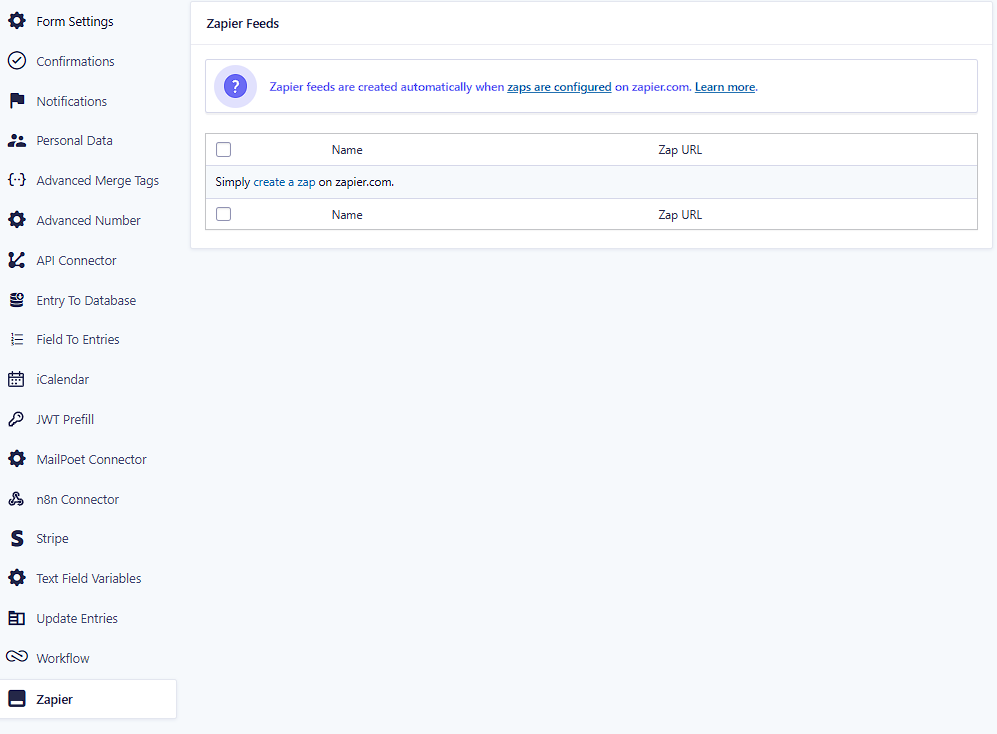
On the Zapier side, Gravity Forms has an official Zapier Add-On that lets submissions trigger Zaps and connect to thousands of apps. You install the add-on in WordPress, create a REST API key, and authenticate Gravity Forms inside Zapier. From there, your forms can act as a trigger or an action in Zaps.
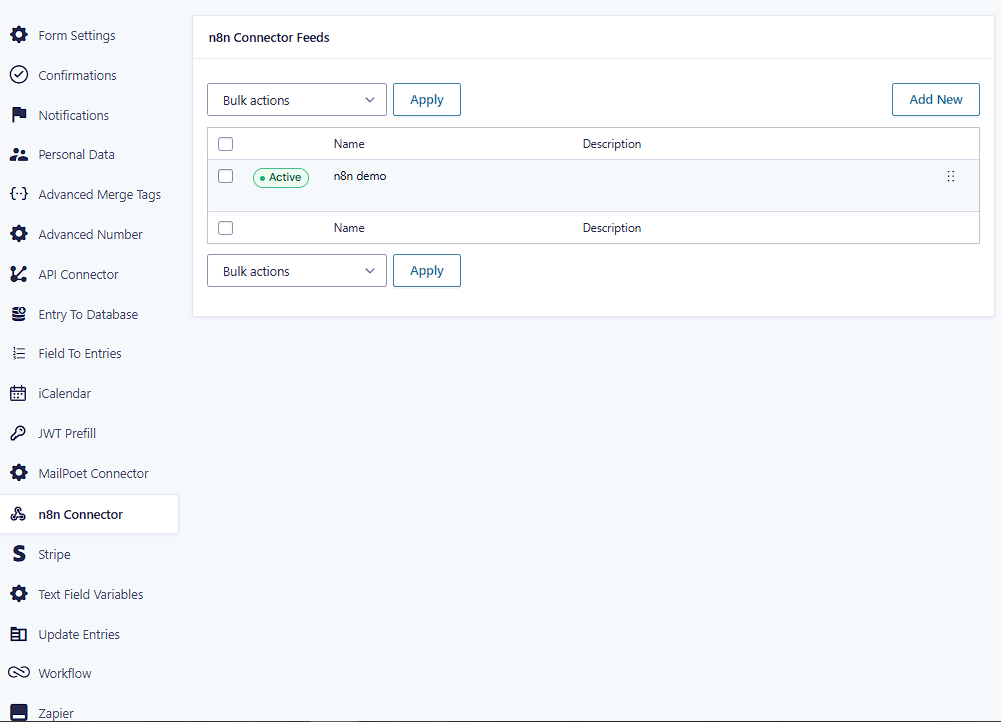
On the n8n side, you can send Gravity Forms submissions to an n8n workflow via webhooks. There are several ways to do that in WordPress, including dedicated connector add-ons. One option is the GravityWP n8n Connector, which lets you configure n8n connections in Forms → Settings → n8n Connector, send entries to an n8n webhook, and map responses from n8n back into Gravity Forms fields or confirmations.
The trade-offs are the same as in the rest of this n8n vs Zapier comparison:
- Zapier gives you the fastest, most “plug-and-play” route if you’re happy with a fully hosted platform.
- n8n gives you more control over where your workflows run and how complex they can become, especially if you self-host and tap into community nodes or custom APIs.
When Zapier Is the Right Choice
Even though this article leans slightly toward n8n for long-term control, there are plenty of scenarios where Zapier is genuinely the better fit:
- You’re a solo founder, marketer, or VA who needs a few simple workflows.
- Your stack is mostly mainstream SaaS, and Zapier already has polished integrations for everything.
- You don’t want to think about servers, Docker, or self-hosting.
- Your automations don’t run at massive volume, so task-based pricing is acceptable.
In those cases, there’s no need to abandon Zapier just because self-hosted tools are popular. The right tool is the one that reduces friction for you right now.
When n8n Is the Better Long-Term Fit
n8n starts to shine when you zoom out and think about cost, control, and complexity over the next few years, not just the next few days.
It’s probably the better fit if:
- You want a self-hosted Zapier alternative so that sensitive data never leaves infrastructure you control.
- Your workflows are complex: loops, conditionals, error handling, multiple systems, and AI chained together.
- You like the idea of paying per execution or just paying a fixed VPS fee for self-hosted n8n instead of paying for every granular task in Zapier.
- You already have or can access technical people who are comfortable managing automation as part of your stack.
- You want the option to extend the platform with community nodes or your own custom nodes when official integrations don’t exist.
If you’re a Gravity Forms user, this can be a natural upgrade path: your forms stay the same, but instead of relying on many small Zaps, you centralize logic in n8n workflows behind a single connector.
Thinking About Switching from Zapier to n8n
You don’t have to pick a permanent winner in the n8n vs Zapier debate or move everything overnight. A practical way to explore n8n without breaking your current setup is:
- Pick one Zap that’s causing real pain maybe the one with the highest task count or the most complicated branching.
- Rebuild it in n8n as a workflow. Start with the same logic to validate the behavior, then improve it with clearer branching or better error handling.
- Once it’s stable, compare cost and clarity: is the n8n version easier to reason about and cheaper to run at scale?
- If you use Gravity Forms today with the official Zapier Add-On, you can switch that feed over to an n8n-based setup by sending submissions to an n8n webhook instead for example, via the GravityWP n8n Connector or another webhook/automation plugin. The form stays the same, but the automation logic moves from Zapier into n8n.
From there, you can decide calmly:
- Which Zaps stay in Zapier because they’re tiny and convenient.
- Which workflows move to n8n because they benefit from control, structure, or cost savings.
Conclusion: n8n vs Zapier Isn’t About Picking a “Winner”
So, which tool should you choose?
- Zapier is still the fastest way for most non-technical teams to spin up reliable, low-maintenance automations and simple AI workflows across thousands of apps.
- n8n is better suited to teams that:
- Care deeply about where their data lives.
- Need advanced workflows that go beyond “trigger → one or two actions.”
- Want the option to self-host and treat automation as a core part of their infrastructure.
- Care deeply about where their data lives.
If Zapier is working for you and your automations are small, there’s no pressure to leave. But if you’re feeling capped by cost, complexity, or control, exploring n8n is a logical next step.
You don’t have to choose a permanent winner. Start by moving one important workflow, see how it feels in n8n, and let your own experience decide whether it becomes your main automation platform.
Our Premium add-ons for Gravity Forms
Advanced Number Field
Functionality for Number Fields, like rounding or only absolute numbers, fixed point notation, range calculation, custom units like % or m2 & show as slider.
Advanced Merge Tags
This Gravity Forms Add-On adds extra Merge Tag modifiers (and a lot of power). From the most common used functions like capitalize and length to changing date formats.

All Entries
All your new Gravity Forms entries in one central place. Stop navigating between multiple forms to find new entries. Get immediate oversight and full control with a powerful, unified dashboard.

Entry to Database
Integrates Gravity Forms with internal or external databases, offering flexible mapping of form fields to database columns and real-time synchronization between entries and database rows.
Read tutorials about

How to Create a Public Submission Business Directory in WordPress (Gravity Forms + GravityView)
Build a moderated business directory where users submit listings through a form, admins approve entries, and approved businesses appear in a searchable GravityView directory.

How to Create an Event Workshop Registration + Waitlist System in WordPress
This guide shows how to set up a workshop registration + waitlist system in WordPress: register attendees until capacity is reached, waitlist the rest, approve entries, and auto-promote people when a seat opens using Gravity Forms, Gravity Flow, and GravityView.

Gravity Flow Form Submission Step Tutorial
The Gravity Flow Form Submission step pauses a workflow until another form is submitted, then continues once the handoff is complete. This guide shows how to connect two forms, prefill fields with mapping, send the correct secure link, and troubleshoot the most common “workflow didn’t move” issues.
Gravity Flow Delete an Entry Step Tutorial
The Gravity Flow Delete Entry step lets you trash or permanently remove Gravity Forms entries as part of a workflow. This guide covers the key settings, scheduling options (delay or date-based), and safe testing tips so you can follow retention and privacy rules with confidence.