Product icon

Merge Tags

v1.4.5 (08 January 2026)

Changelog

Changelog Merge Tags

= 1.4.5 = * Security: Sanitize and validate 'tab' parameter to prevent potential Local File Inclusion. Credits: Nguyen Xuan Chien via Patchstack = 1.4.4 = * Removed date field inputs and list field columns from the Merge Tag lists, as they do not work for these fields. * Add the full checkboxes merge tags on the Merge Tag tab. = 1.4.3 = * Added option to use dynamic field labels in All Fields tab. = 1.4.2 = * Added JWT prefill string to Dynamic Population tab. = 1.4.1 = * Fix admin links for sites using Bedrock. * Added Workflow Status button to workflow tab. = 1.3 = * Added tab for Calculations. * Added tab for Dynamic Population. * Added and fixed translations. * Added Gravity Forms conditional shortcode to All Fields tab. * Added GravityView gvlogic shortcode to All Fields tab. * Added sub-input fields to Advanced tab. = 1.2.0 = * Added filter for Meta tab. * Added quick links to Merge Tags in top admin menu for recent forms. * Added {today} merge tag to standard Merge Tags tab. * Fix url query string excel formula template. * Include ENCODEURL in excel formula template + localized version. * Minor type fixes and code quality improvements. * Updated Gravity View Merge Tags list for Meta tab. = 1.1.4 = * Added Conditional Logic tab. = 1.1.3 = * Advanced tab: Fixed output historical values for deactivated dynamic population. = 1.1.2 = * Fix all fields table merge tags (remove spaces). * Fix some PHP notices. * Added GravityWP Advanced Merge Tags modifiers. = 1.1 = * Compatibility with Gravity Forms 2.5 User Interface * Merged Admin tab into Advanced tab * Advanced tab: Improved UI with options to toggle columns * Advanced tab: Optionally include display only fields like section and html * Advanced tab: Optionally include Merge Tags for radio / checkboc choices * Added a link to our (premium) Advanced Merge Tag plugin * Security enhancements * Various small changes / fixes = 1.0.3 = * Added default Gravity Forms editor menu * Fix HTML error on first page * Added column for Gravity Flow Step conditions * Added dynamic population query urls templates = 1.0.2 = * Improved table layout (to wp-list-table widefat striped) * Rearrange tabs (information about forms merge tags first, than standard merge tags) * Renamed tabs (shorter descriptions, more focussed) = 1.0.1 = * Updated capabilities to give everyone with 'gravityforms_edit_forms' capability the possibility to see the Merge Tag page (thank you @siwax) = 1.0 = * Solved the link from the form menu to the Merge Tag page giving errors * Tested the plugin with many testers. Ready for version 1.0 = 0.9 = * Added the 'Admin' tab, with an overview of Admin Labels, Dynamic Population, CSS and Field Type in one overview. Ideal if you want to quickly see what CSS is used per field or what text you should use when generating an url with arguments (populate) * Made the code more readable, added comments = 0.8 = * Removed code that added specific extra merge tags because of problems after updating to GF version 2.3 = 0.7 = * Added a tab for Gravity Flow (when active) to show a table with Gravity Flow Step, Step ID, Step Type, Step Active and GravityWP - Count shortcode in combination with Gravity Flow = 0.6 = * Changed tabs layout to make it more convenient to copy and paste to Excel * First tab with only Merge Tags from the current form * Second tab (advanced) with more detailed information about the field: Label, Merge Tag, Short Merge Tag, Field Input Type * Third tab with Standard Gravity Forms Merge Tags * New tab (All Fields) to replace the allfields Merge Tag from Gravity Forms. It generates a table you can copy and paste and a table without fileuploads (in case you don't want to communicate links to files) = 0.5 = * Added Tabs * Styled the lists * Added overview of Field Labels * Added overview of Field Types * Removed the shortcode for generating the Merge Tags list * Added text-domain for translations = 0.4 = * Added Gravity Forms standard Merge Tags * Added GravityView specific Merge Tags * Added Gravity Flow specific Merge Tags = 0.3 = * Added admin page with all the merge tags of a specific form * Added menu links in the sidebar and in the Gravity Forms toolbar = 0.2 = * Added check if Gravity Forms is installed * Return instead of echo, so the list will be placed in the right place on the page = 0.1 = * First launch of the shortcode to show all merge tags

Documentation

$49.00 (yearly, excl. VAT)

buy now


Gravity Forms merge tags can be hard to track across big forms. This add-on adds a single admin page that lists every available tag and modifier per field, so you can find, copy, and use the right tag without guesswork.


Gravity Forms Merge Tags Features

Besides that it gives you information (in different tabs) about:

  • Field types
    Shows what kind of type the Field is, like text, radio, hidden, select, email, checkbox, etc.
  • Available default Merge Tags and Modifiers
    A tab with information about standard Merge Tags & Modifiers from Gravity Forms, GravityView, Gravity Flow and Advanced Merge Tags.
  • Generate a table with all Merge Tags in HTML
    An alternative for the all_fields Merge Tag (with or without fileuploads).
  • Gravity Flow Step information
    Gives an extra tab with information about configured Gravity Flow steps.
  • Admin labels, populate slug, CSS
    Quick overview of your Admin Labels, Dynamic Populate settings and Custom CSS.

“Literal godsend. I have a form with over 300 fields. This plugin is simply amazing!!!!

Great work and thank you!”


Jason Robie


Gravity Forms Merge Tags Screenshots

Advanced Tab
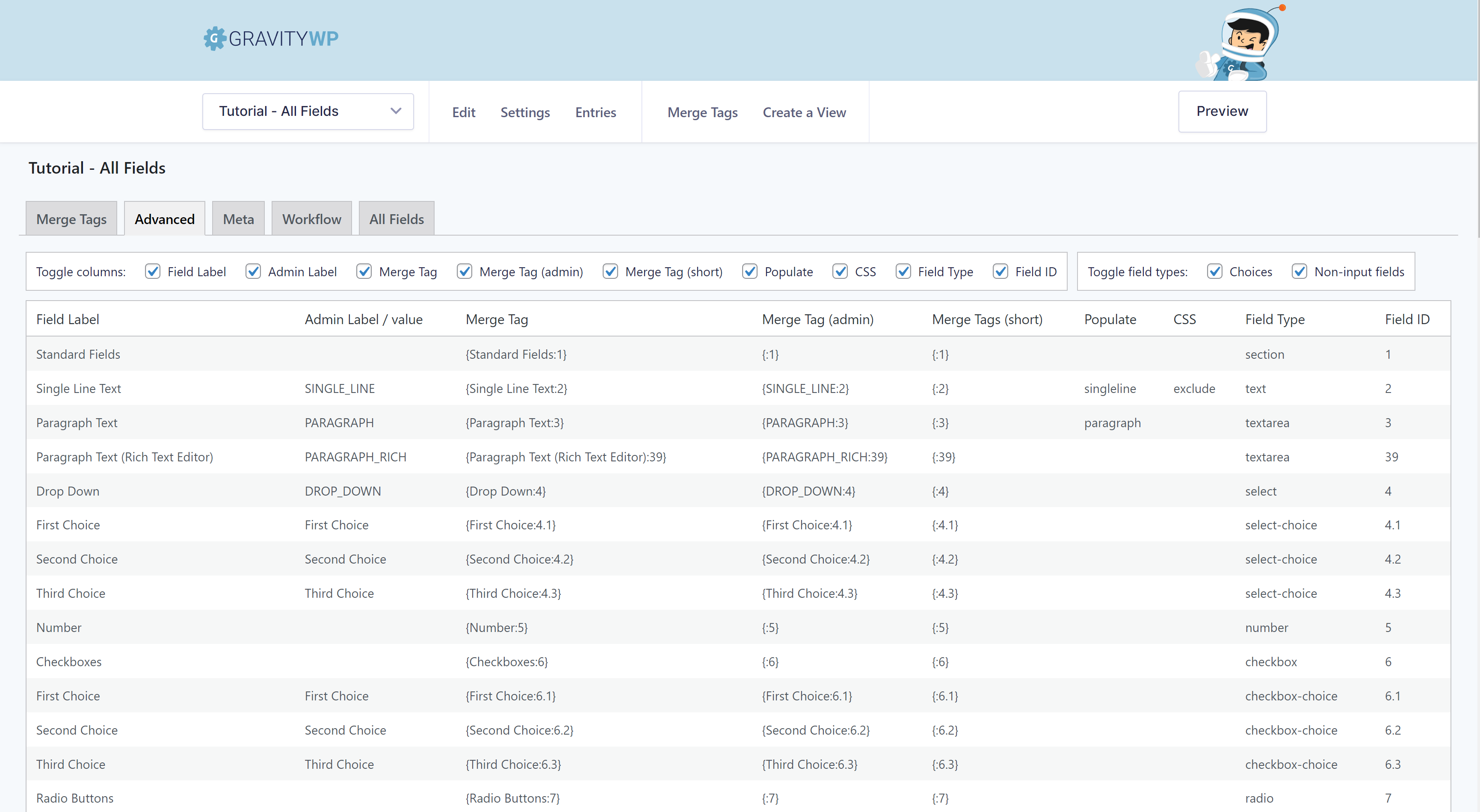
Screenshot of the Advanced Tab in GravityWP – Merge Tags, showing the Admin Label, the Merge Tag, Field Label, the Populate settings, CSS and the Field Type. With option to toggle columns and field types off and on.

Custom Table All Fields

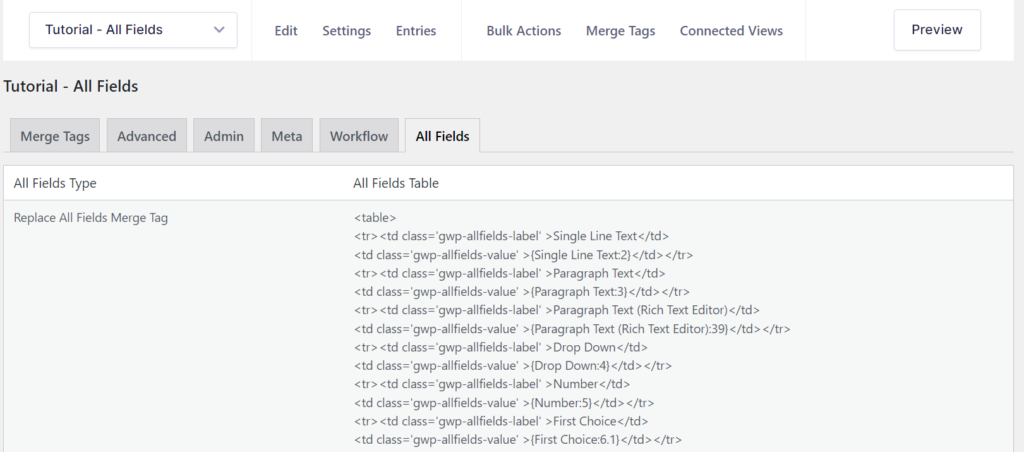
The All Fields Tab generates a HTML table with all the fields, automatically setting the label td with the label and the value td with the Merge Tag. This way it's easy to copy and paste and customize a specific table.
The All Fields Tab generates a HTML table with all the fields, automatically setting the label td with the label and the value td with the Merge Tag. This way it’s easy to copy and paste and customize a specific table.

Default Merge Tags & Modifiers

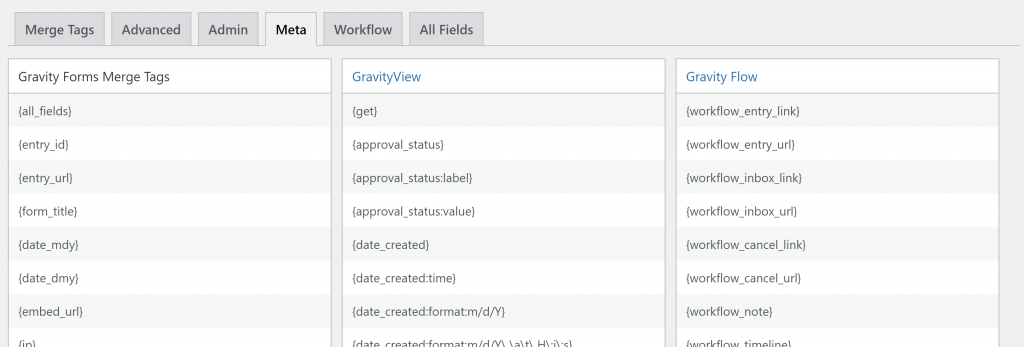
Screenshot of the Meta Tab in GravityWP – Merge Tags with the available default Merge Tags and Modifiers. When GravityView or Gravity Flow is installed, it will also show the default Merge Tags and Modifiers for those Add-ons.

Workflow Step information

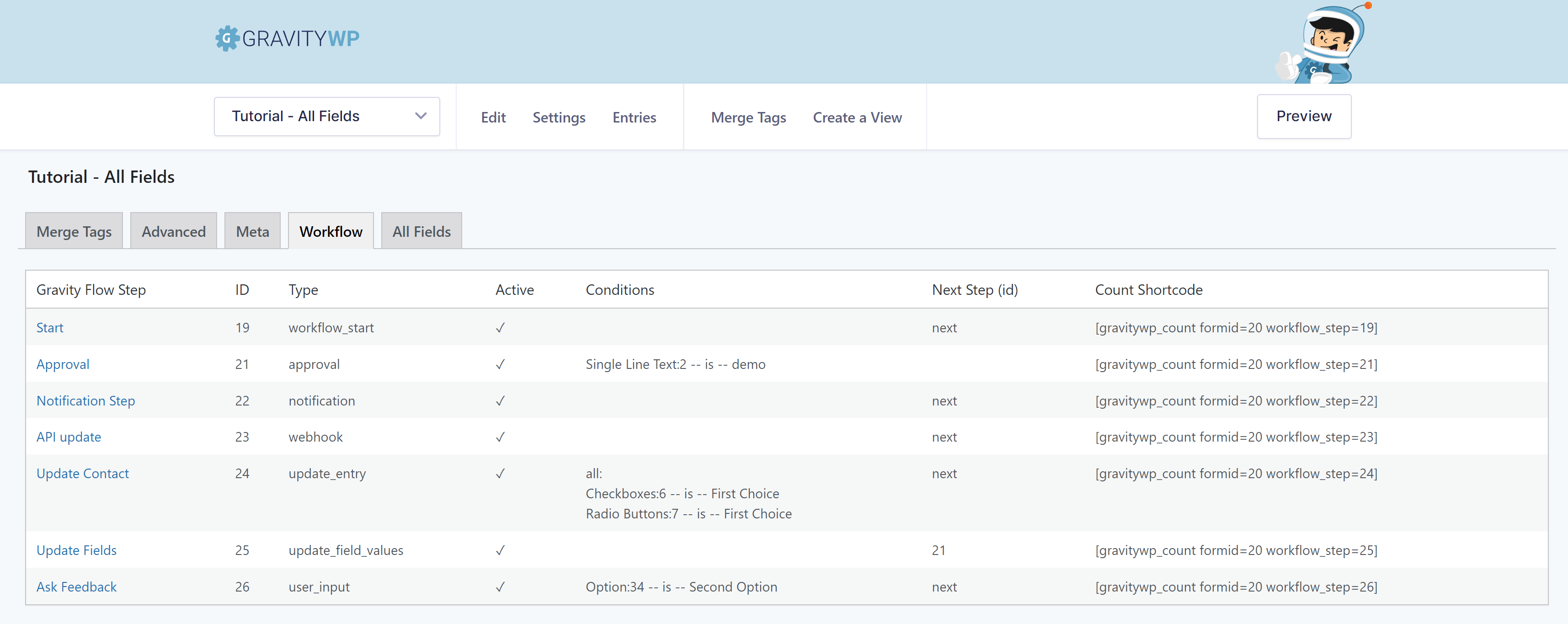
Screenshot of the Workflow Tab in GravityWP – Merge Tags. This Tab is only visible when GravityFlow is activated on the site and shows the Step title, ID, status, Conditions, Next Step ID and if GravityWP - Count shortcode to count the entries that are currently paused at that step.
Screenshot of the Workflow Tab in GravityWP – Merge Tags. This Tab is only visible when GravityFlow is activated on the site and shows the Step title, ID, status, Conditions, Next Step ID and if GravityWP – Count shortcode to count the entries that are currently paused at that step.

Conditional Logic information

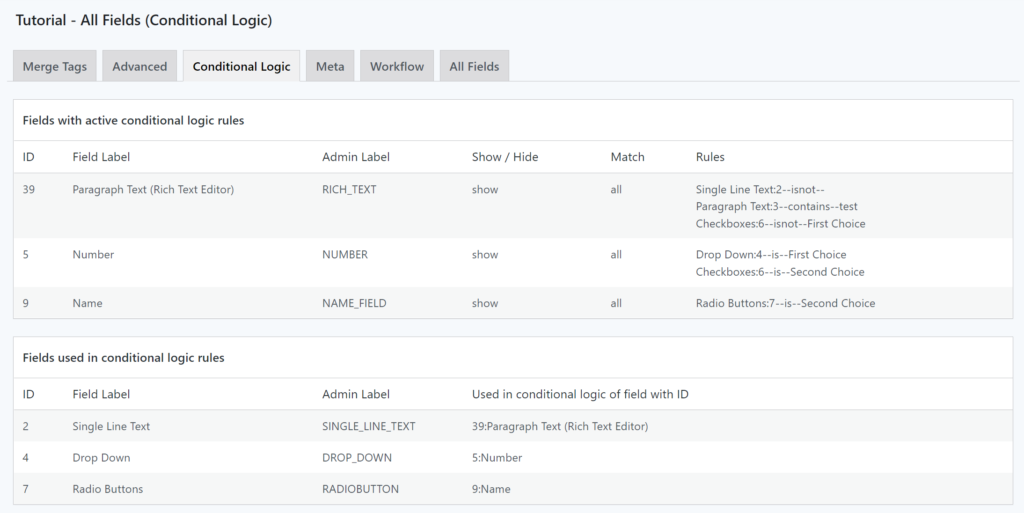
Screenshot of the Conditional Logic Tab in GravityWP – Merge Tags. It shows Fields with active conditional logic rules & Fields used in conditional logic rules.

Just what I needed! All the merge tags info on one page – the more I worked with it the more I loved it! Even has an extra tab with meta merge tags. Had a project building custom PDF documents with GF data and this plugin is super handy to have. Thank you!

Jess

Gravity Forms Merge Tags – FAQ

What does GravityWP merge tag add-on do?

It adds an admin page that lists all available tags and modifiers per field, so you can quickly find and copy the right tag.

Does it change the form or entries?

No. It’s a reference/overview tool. It doesn’t alter entries or front-end behavior.

Does it work with GravityView and Gravity Flow?

Yes. When those plugins are active, the Meta tab also shows their default tags and modifiers.

What’s in the “All Fields” tab?

A copy-ready HTML table of your fields with their tag placeholders handy for documentation or templating.

Where do I find field IDs and labels?

Use the Advanced tab to see IDs, admin labels, populate settings and CSS info for each field.

ADD-ON MERGE TAGS

Get a clear overview of available Merge Tags & Modifiers.

Download


Gravity Forms merge tags can be hard to track across big forms. This add-on adds a single admin page that lists every available tag and modifier per field, so you can find, copy, and use the right tag without guesswork.


Gravity Forms Merge Tags Features

Besides that it gives you information (in different tabs) about:

  • Field types
    Shows what kind of type the Field is, like text, radio, hidden, select, email, checkbox, etc.
  • Available default Merge Tags and Modifiers
    A tab with information about standard Merge Tags & Modifiers from Gravity Forms, GravityView, Gravity Flow and Advanced Merge Tags.
  • Generate a table with all Merge Tags in HTML
    An alternative for the all_fields Merge Tag (with or without fileuploads).
  • Gravity Flow Step information
    Gives an extra tab with information about configured Gravity Flow steps.
  • Admin labels, populate slug, CSS
    Quick overview of your Admin Labels, Dynamic Populate settings and Custom CSS.

“Literal godsend. I have a form with over 300 fields. This plugin is simply amazing!!!!

Great work and thank you!”


Jason Robie


Gravity Forms Merge Tags Screenshots

Advanced Tab

Screenshot of the Advanced Tab in GravityWP – Merge Tags, showing the Admin Label, the Merge Tag, Field Label, the Populate settings, CSS and the Field Type. With option to toggle columns and field types off and on.

Custom Table All Fields

The All Fields Tab generates a HTML table with all the fields, automatically setting the label td with the label and the value td with the Merge Tag. This way it's easy to copy and paste and customize a specific table.
The All Fields Tab generates a HTML table with all the fields, automatically setting the label td with the label and the value td with the Merge Tag. This way it’s easy to copy and paste and customize a specific table.

Default Merge Tags & Modifiers

Screenshot of the Meta Tab in GravityWP – Merge Tags with the available default Merge Tags and Modifiers. When GravityView or Gravity Flow is installed, it will also show the default Merge Tags and Modifiers for those Add-ons.

Workflow Step information

Screenshot of the Workflow Tab in GravityWP – Merge Tags. This Tab is only visible when GravityFlow is activated on the site and shows the Step title, ID, status, Conditions, Next Step ID and if GravityWP - Count shortcode to count the entries that are currently paused at that step.
Screenshot of the Workflow Tab in GravityWP – Merge Tags. This Tab is only visible when GravityFlow is activated on the site and shows the Step title, ID, status, Conditions, Next Step ID and if GravityWP – Count shortcode to count the entries that are currently paused at that step.

Conditional Logic information

Screenshot of the Conditional Logic Tab in GravityWP – Merge Tags. It shows Fields with active conditional logic rules & Fields used in conditional logic rules.

Just what I needed! All the merge tags info on one page – the more I worked with it the more I loved it! Even has an extra tab with meta merge tags. Had a project building custom PDF documents with GF data and this plugin is super handy to have. Thank you!

Jess

Gravity Forms Merge Tags – FAQ

What does GravityWP merge tag add-on do?

It adds an admin page that lists all available tags and modifiers per field, so you can quickly find and copy the right tag.

Does it change the form or entries?

No. It’s a reference/overview tool. It doesn’t alter entries or front-end behavior.

Does it work with GravityView and Gravity Flow?

Yes. When those plugins are active, the Meta tab also shows their default tags and modifiers.

What’s in the “All Fields” tab?

A copy-ready HTML table of your fields with their tag placeholders handy for documentation or templating.

Where do I find field IDs and labels?

Use the Advanced tab to see IDs, admin labels, populate settings and CSS info for each field.

Proudly powered by WordPress
How can I help you?